


SitecoreAI Pathway: Migration Accelerator, Not Magic
What SitecoreAI Pathway does, where it helps, and how to plan a safe migration
 Written by Amit Kumar
Posted on July 30, 2026 • 10 minutes • 1934 words
Table of contents
- 📊 Introduction
- 💡 Why this matters now
- 🚚 The migration challenge
- 🤖 What is SitecoreAI Pathway?
- 🛤️ Supported migration paths
- ⚖️ What SitecoreAI Pathway does and does not do
- 🔄 SitecoreAI Pathway workflow
- 🛠️ Prerequisites and readiness checklist
- 📋 Tool comparison
- 🧭 Decision guidance
- 🧠 Common misconceptions
- 🏆 Best practices
- 🛡️ How SitecoreAI Pathway Fits into a Governed Migration Architecture?
- 💬 FAQ
- 🧾 Summary
- 🧾Credit/References
SitecoreAI Pathway is best understood as an AI-assisted migration accelerator. It can help teams extract, group, map, validate, and migrate structured content into SitecoreAI, but it should not be treated as a magic lift-and-shift button.
That distinction matters. Sitecore’s own documentation describes SitecoreAI Pathway as an app for moving structured content from Sitecore XM/XP or publicly accessible websites into SitecoreAI, with a workflow that includes media preparation, source extraction, mapping, migration, and validation. It also states that SitecoreAI Pathway does not migrate page and partial designs or XP-related items such as xDB data, email marketing content, and personalization.
Practical takeaway is simple
Use SitecoreAI Pathway to accelerate repeatable content migration.
Do not use it as a substitute for target architecture, content strategy, component design, integration planning, or human validation.
Many Sitecore estates are moving from older XM/XP and MVC implementations toward SaaS, composable architecture, headless delivery, and AI-enabled content operations. But migration is not only a technical transfer. It is a chance to decide what should move, what should be redesigned, what should be retired, and what should be rebuilt differently.
Sitecore Accelerate Guidance
Sitecore Accelerate guidance makes this point clearly: moving to SaaS is not simply moving one CMS into another cloud environment. Teams need to clarify value, scope, business priorities, readiness, integrations, processes, and operating model before implementation.
This is where SitecoreAI Pathway becomes useful. It can reduce repetitive migration effort, but only after the migration strategy is clear.
CMS migration sounds simple until the team gets into the details.
A typical legacy Sitecore implementation may include:
Content items and templates
MVC renderings and Razor views
Media assets
Multilingual variants
Content Approval Workflows
Personalization rules
Analytics dependencies
Custom modules
Third-party integrations
Search and redirects
Publishing processes
Content ownership gaps
The hard part is not only moving content. The hard part is making sure the new platform does not inherit old complexity.
Sitecore Accelerate Guidance
Sitecore Accelerate’s content audit guidance recommends deciding what content should be moved as-is, rewritten, redesigned, or deleted before migration. It also recommends aiming as close as possible to a greenfield implementation so the new platform can properly benefit from SitecoreAI/XM Cloud capabilities.
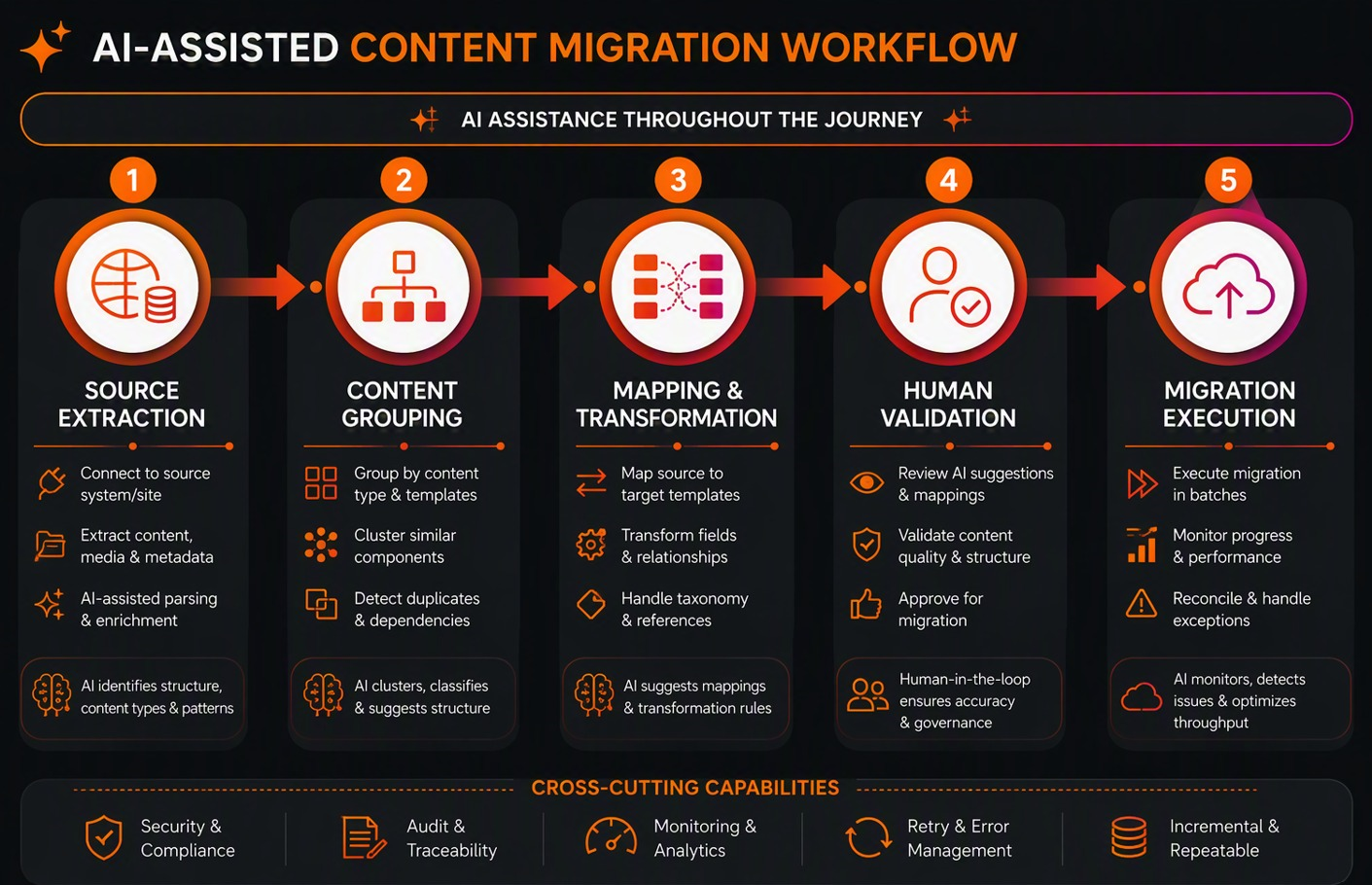
SitecoreAI Pathway is an AI-assisted migration app for moving structured content into SitecoreAI. According to Sitecore documentation, it supports two main migration paths:
Migration from a Sitecore website - for existing Sitecore XM/XP sites, using direct extraction from the source environment.
Migration from any other publicly accessible website - using AI-powered web crawling from a sitemap or selected URLs.
| Migration path | Source | How SitecoreAI Pathway obtains data | Best fit | Key watchout |
|---|---|---|---|---|
| Sitecore website | Sitecore XM/XP | Direct source extraction | Existing Sitecore estates | Target SitecoreAI structure must already exist |
| Any website | Public non-Sitecore site | AI crawler using sitemap or URLs | Public HTML sites or non-Sitecore sources | Site must be publicly accessible or crawler access must be allowed |
| Multi-site estate | One site at a time | Repeatable migration waves | Brands, regions, or site portfolios | Scale only after a representative pilot |
Reusability
Sitecore documentation notes that SitecoreAI Pathway can migrate one site and repeat the process for multiple sites, and that it supports sites in multiple languages.
| Area | SitecoreAI Pathway helps with | SitecoreAI Pathway does not replace |
|---|---|---|
| Source understanding | Extracting or crawling source content | Content strategy and business decisions |
| Mapping | Grouping pages/components and suggesting mappings | Human validation and final approval |
| Migration execution | Moving mapped content into SitecoreAI | Architecture redesign |
| Media | Non-Sitecore website image import where enabled | Sitecore media migration strategy |
| Templates/components | Mapping into target structures | Creating the full target architecture |
| MVC modernization | Content migration support | Automatic MVC-to-Next.js or Headless SXA conversion |
| XP features | Some site content migration | xDB, analytics, EXM, personalization, custom integrations |
Sitecore's Move to SitecoreAI with Pathway article states that media library assets must be migrated using the XM-to-XMC migration tool and templates must be recreated in SitecoreAI. It also states that workflow states, personalization rules, analytics data, and custom modules or integrations are not migrated.
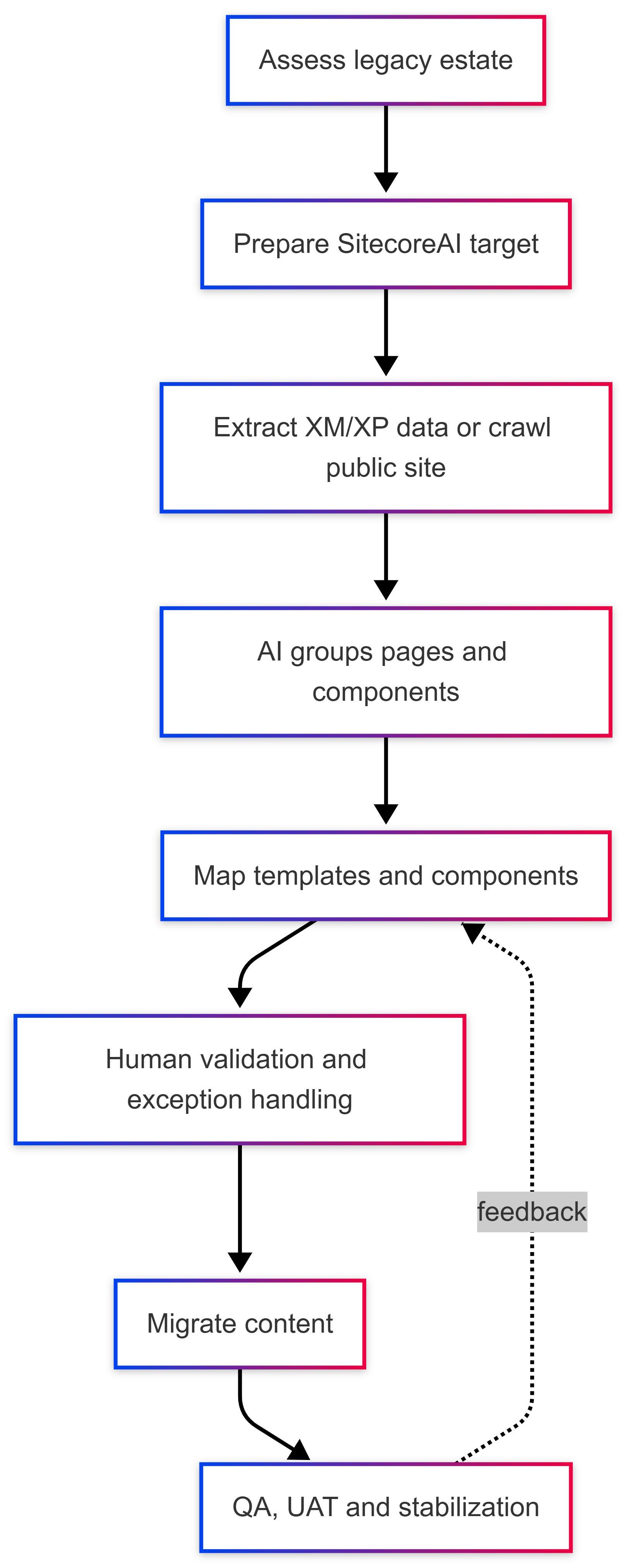
The important point is sequencing. Do not run migration automation before the target model exists. Sitecore documentation says the target SitecoreAI structure should be set up first, including layouts, templates, components, page designs, partial designs, and page-design mappings.
Before a production migration, confirm:
Target SitecoreAI site exists.
Layouts, templates, components, page designs, and partial designs are ready.
Content audit is complete.
Migration scope is agreed.
Source access is available.
Media migration approach is defined.
Content ownership and approval workflow are clear.
Mapping rules and exception process are documented.
QA and UAT criteria are agreed.
Rollback and remediation path is understood.
Unsupported XP/MVC features have separate workstreams.
Media planning deserves special attention. Sitecore documentation states that Experience Edge imposes a 50 MB limit for media items published on Edge and recommends Sitecore Content Hub for media items larger than 50 MB and up to 50 GB.
| Dimension | SitecoreAI Pathway | XM to XM Cloud Migration Tool | Manual migration |
|---|---|---|---|
| Primary role | AI-assisted mapping and migration into SitecoreAI | Move backend content, media, and users | Human-led migration or rewrite |
| Source fit | XM/XP or public websites | Sitecore XM on-prem/PaaS | Any source |
| Best use | Repeatable content migration into prepared target | Supported backend transfer | Exception-heavy or curated content |
| Architecture impact | Depends on prepared target model | Does not migrate front-end layouts/renderings | Highest control, highest effort |
| Validation | Human review and migration validation | Project-defined | Must be designed manually |
Sitecore’s developer portal describes the XM-to-XM Cloud Migration Tool as middleware for moving content, media, and user data from Sitecore XM to XM Cloud, available as GUI and CLI. The same page states that it focuses on backend data and does not migrate front-end site layouts or renderings.
| Scenario | Recommended approach |
|---|---|
| Large XM/XP site with repeatable content patterns | Pathway-led pilot, then migration waves |
| Legacy MVC site moving to Headless SXA | Target architecture first, then SitecoreAI Pathway for content |
| Sitecore media/content/user transfer | XM-to-XM Cloud tooling where supported |
| Public non-Sitecore website | SitecoreAI Pathway crawler pilot |
| Small curated site | Manual migration may be simpler |
| Heavy XP/xDB/personalization dependency | Modernization assessment before migration execution |
Sitecore Accelerate guidance for XM/XP to XM Cloud says Headless SXA is required for XM Cloud, CSS and HTML can be reused from MVC, and content must be reshaped to match the Headless SXA architecture.
Start with content audit, not tooling. Decide what to keep, update, remove, rewrite, or redesign.
Prepare the target first. Content models, components, page designs, and governance need to exist before mapping.
Pilot with representative content. Include common templates and edge cases.
Separate content migration from modernization. Do not hide code, UX, integration, or analytics work under the migration tool.
Use a hybrid model. Combine SitecoreAI Pathway, XM-to-XMC tooling, scripts, and manual review where each fits.
Measure quality, not just migration completion. Track broken links, missing media, unmapped fields, rendering issues, and content-owner sign-off.
Scale only after one repeatable pattern works.
The below diagram explains how SitecoreAI Pathway supports a step-by-step migration.
SitecoreAI Pathway is an AI tool from Sitecore that moves content from legacy XM/XP sites or public websites into SitecoreAI. It helps with prepping the source, extracting content, mapping templates, running the migration, and checking the results.But the main point is: it’s a helper, not the whole solution.
SitecoreAI Pathway can automate extraction and mapping, but you still need a ready target setup, human reviews, QA, and a plan for exceptions - things like media, integrations, personalization, analytics, and custom code.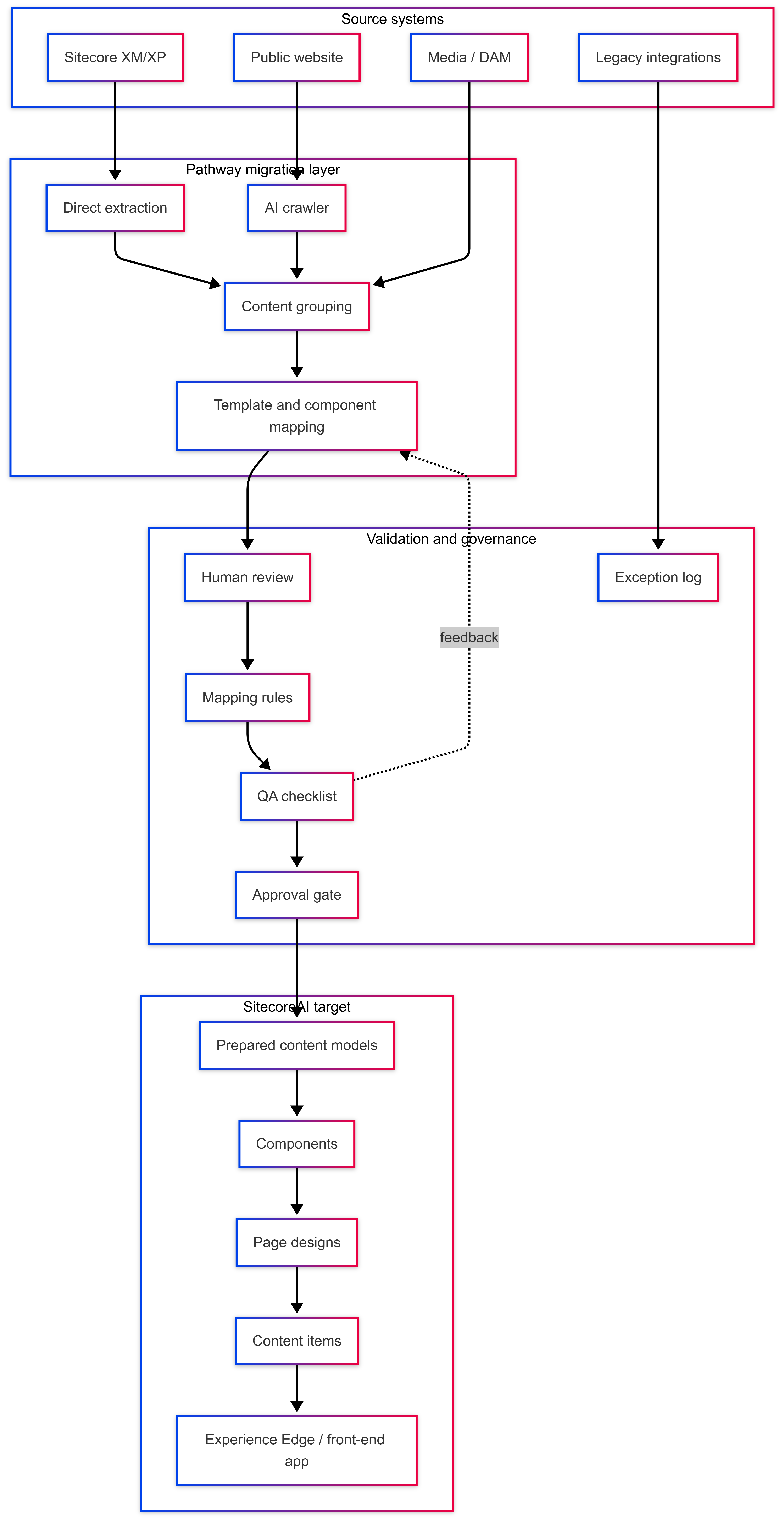
Figure: AI-assisted extraction and mapping, human validation, governance controls, and a prepared SitecoreAI target.
Target-First SitecoreAI Pathway Migration Flow: This architecture shows how SitecoreAI Pathway fits into a governed migration journey rather than a simple lift-and-shift.
- Source systems such as Sitecore XM/XP, public websites, media repositories, and legacy integrations feed into the SitecoreAI Pathway migration layer
- In SitecoreAI Pathway, where direct extraction or AI-powered crawling supports content grouping and template/component mapping.
- The validation and governance layer is deliberately placed before the SitecoreAI target because AI-assisted mapping still needs human review, mapping rules, exception handling, QA checks, and approval gates. Sitecore positions Pathway as human-validated, with AI proposing mappings while teams review and validate quality and outcomes.
- The target side represents the prepared SitecoreAI model: content models, components, page designs, content items, and delivery through Experience Edge or a front-end application.
This target-first approach is important because the target structure should be set up before migration, including layouts, templates, components, page designs, partial designs, and template mappings