


Introduction to SitecoreAI and Microsoft Dataverse Integration
How SitecoreAI Integrates with Microsoft Dataverse
 Written by Amit Kumar
Posted on May 20, 2026 • 5 minutes • 907 words
This article is part of a series.
- Part 1Introduction to SitecoreAI and Microsoft Dataverse Integration
- Part 2
- Part 3
- Part 4
- Part 5
Table of contents
Today’s enterprise applications are moving toward AI‑driven, connected experiences , where content, customer data, and workflows work seamlessly together.
Integrating SitecoreAI (FKA XM Cloud) with Microsoft Dataverse enables organizations to connect content and structured business data using .NET, Azure services, and API‑based architectures. This combination helps teams deliver secure, scalable, and personalized digital experiences.
In this article, we explore why this integration is important and how it creates a strong foundation for enterprise solutions. Microsoft Dataverse acts as a central, secure data platform that supports personalization, automation, and connected workflows-making it easier for .NET teams to build modern, enterprise‑ready applications.
Most organizations already use Sitecore to manage content and Microsoft systems to manage business and customer data. However, these systems often operate in isolation:
- Marketing teams handle content in Sitecore
- Business teams manage data in CRM, ERP, or other systems
This separation leads to:
- Manual data processing
- Duplicate records
- Inconsistent customer experiences
By integrating SitecoreAI with Dataverse, organizations can move toward a unified architecture.
- Customer interactions (forms, preferences, leads) are stored in Dataverse
- Content delivery in Sitecore becomes smarter and more personalized
- Data becomes easier to govern, secure, and reuse across systems
SitecoreAI with Microsoft Dataverse
For development teams, this approach removes the need for multiple point‑to‑point integrations. Instead, you build against a standardized Microsoft data platform, improving maintainability and scalability.
If you are familiar with SQL Server or Entity Framework, you might wonder why Dataverse is needed.
The key difference is this
Dataverse is not just a database - it is a complete business data platform.
Think of Dataverse as a managed service that gives you:
| Capability | What It Means for Sitecore Developers |
|---|---|
| Structured data storage | Tables with rich data types, relationships, and built-in change tracking |
| First-class API access | REST, OData, and a native .NET SDK (Microsoft.PowerPlatform.Dataverse.Client) |
| Enterprise-grade security | Row-level, column-level, and role-based permissions out of the box |
| Real-time event hooks | Trigger Power Automate workflows when data changes |
| Seamless integration | Works with Azure services, Dynamics 365, Power Apps, Power BI and .NET applications |
| Scalability | Built to support enterprise-grade workloads |
For Sitecore developers, Dataverse becomes the central system of record for business data such as:
- Customer profiles
- Orders and transactions
- Product information
- Support interactions
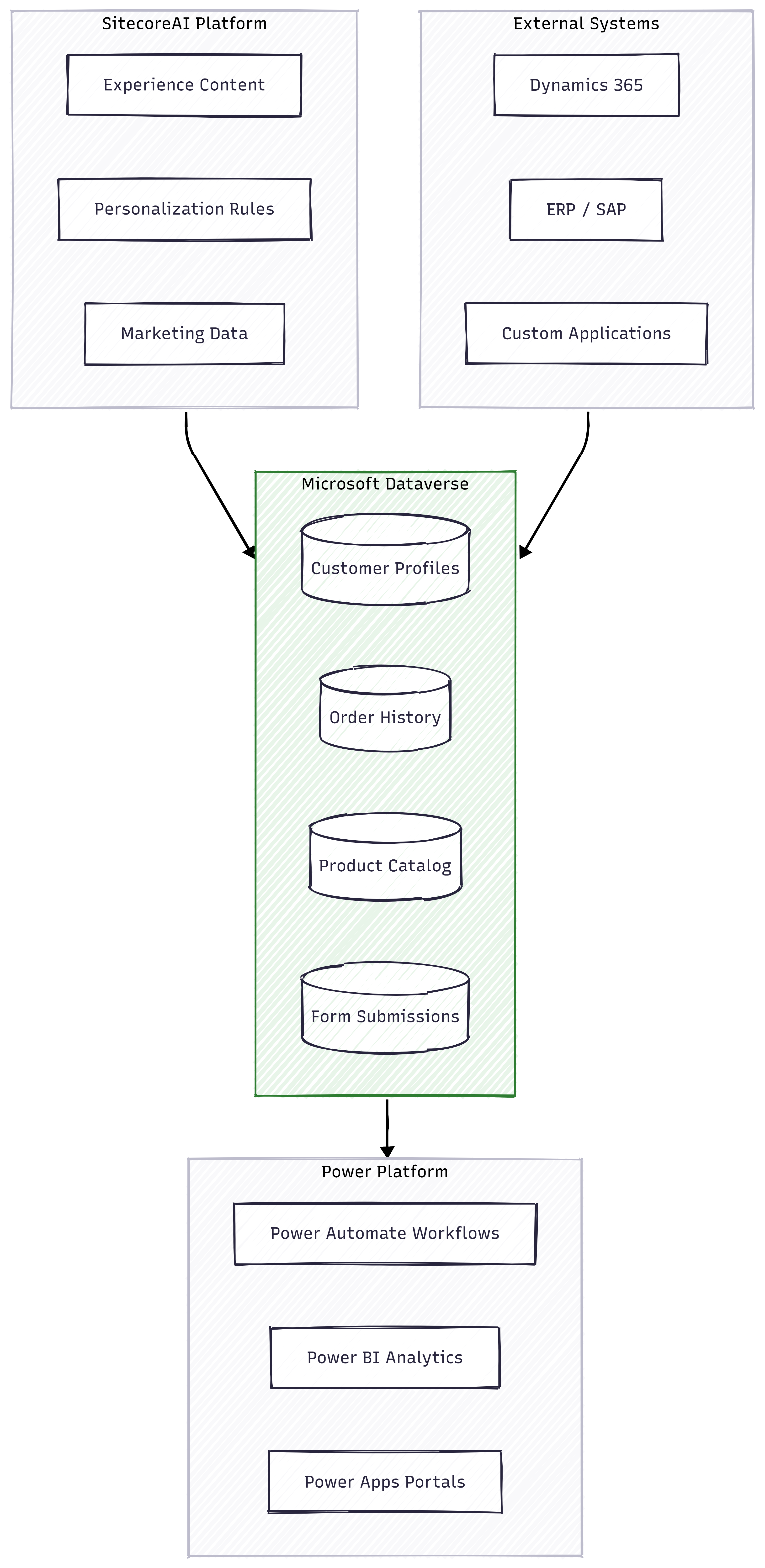
The integration follows a layered architecture that clearly separates responsibilities.
Layer 1: SitecoreAI Platform
This layer handles the customer experience:
- Displays content, pages, and personalization
- Uses Dataverse data to personalize experiences
- Captures user interactions and writes data back
Examples
A returning user visits the website. Sitecore reads customer data from Dataverse and displays personalized content.
Layer 2: External Systems
These are existing enterprise systems such as:
- Dynamics 365 (CRM data, leads, accounts)
- ERP systems (orders, pricing, inventory)
- Custom applications (internal business tools)
External Systems
Instead of integrating each of these systems directly with Sitecore, they connect to Dataverse.
This creates a data hub architecture, simplifying integration.
Layer 3: Microsoft Dataverse
Dataverse acts as the central data layer.
It stores:
- Customer profiles
- Orders and transactions
- Product catalog
- Form submissions
Key capabilities include:
- Customer profiles
- Orders and transactions
- Product catalog
- Form submissions
Microsoft Dataverse
This ensures data is structured, governed, and reusable.
Layer 4: Power Platform
This layer adds automation and analytics:
- Power Automate ➡ triggers workflows
- Power BI ➡ dashboards and reporting
- Power Apps ➡ build apps and portals
Examples
Form submission ➡ Dataverse record ➡ Workflow triggered ➡ Lead created ➡ Dashboard updated
Let me walk you through a real customer journey to see all four layers in action:
- Customer data is synced from CRM into Dataverse
- Sitecore reads customer data and personalizes the experience
- User interacts with the website and submits a form
- Data is written to Dataverse
- Power Automate triggers business workflows
- CRM updates automatically
- Business teams monitor insights through Power BI
End‑to‑End Flow
All systems interact through Dataverse, avoiding direct dependencies.
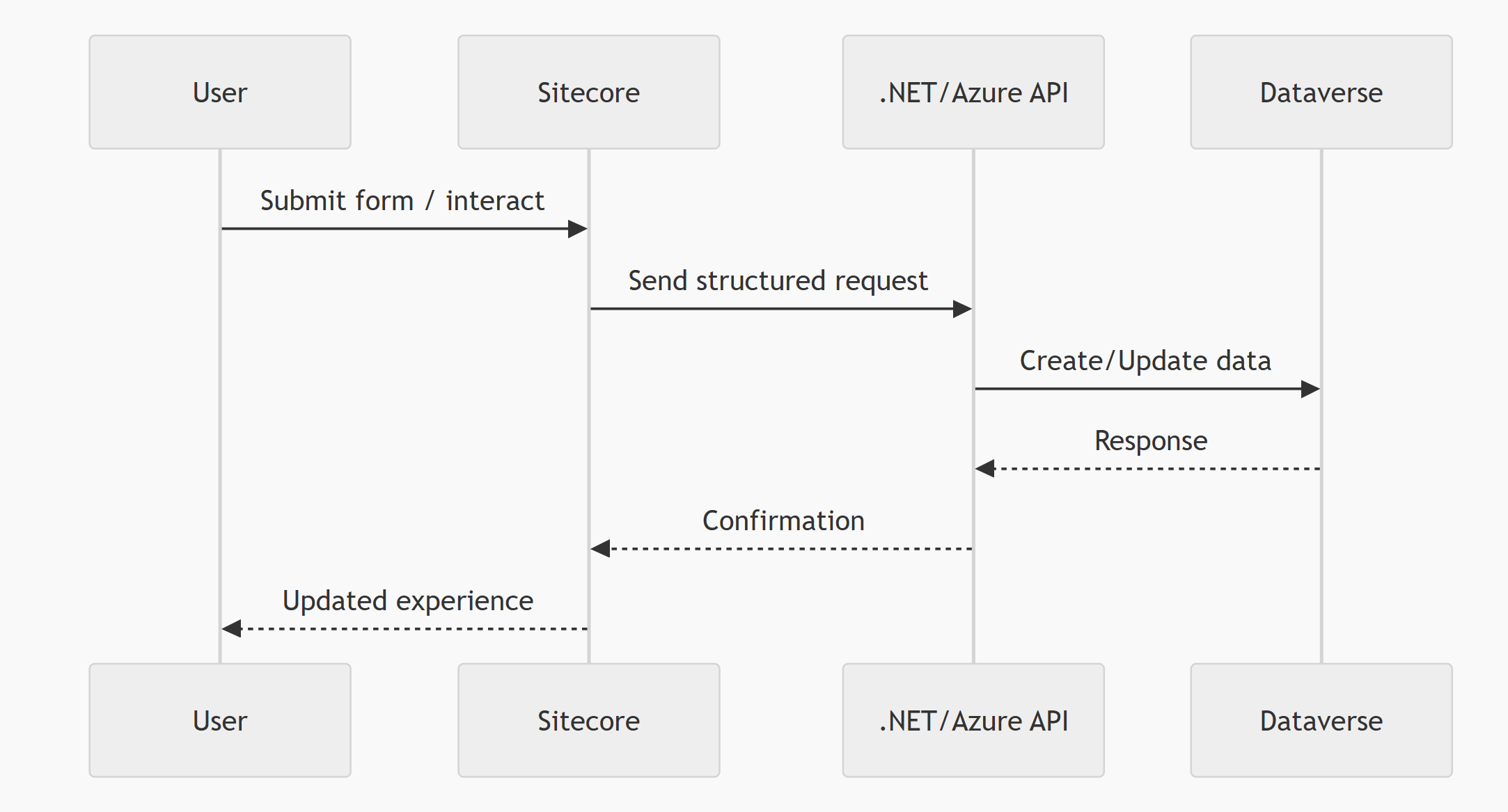
The recommended implementation uses modern Azure and .NET patterns:
1. APIs (Azure Functions or ASP.NET)
- Handle communication between systems
- Scalable and cloud‑friendly
2. Dataverse Web API
- Perform secure CRUD operations
- Standard REST‑based interface
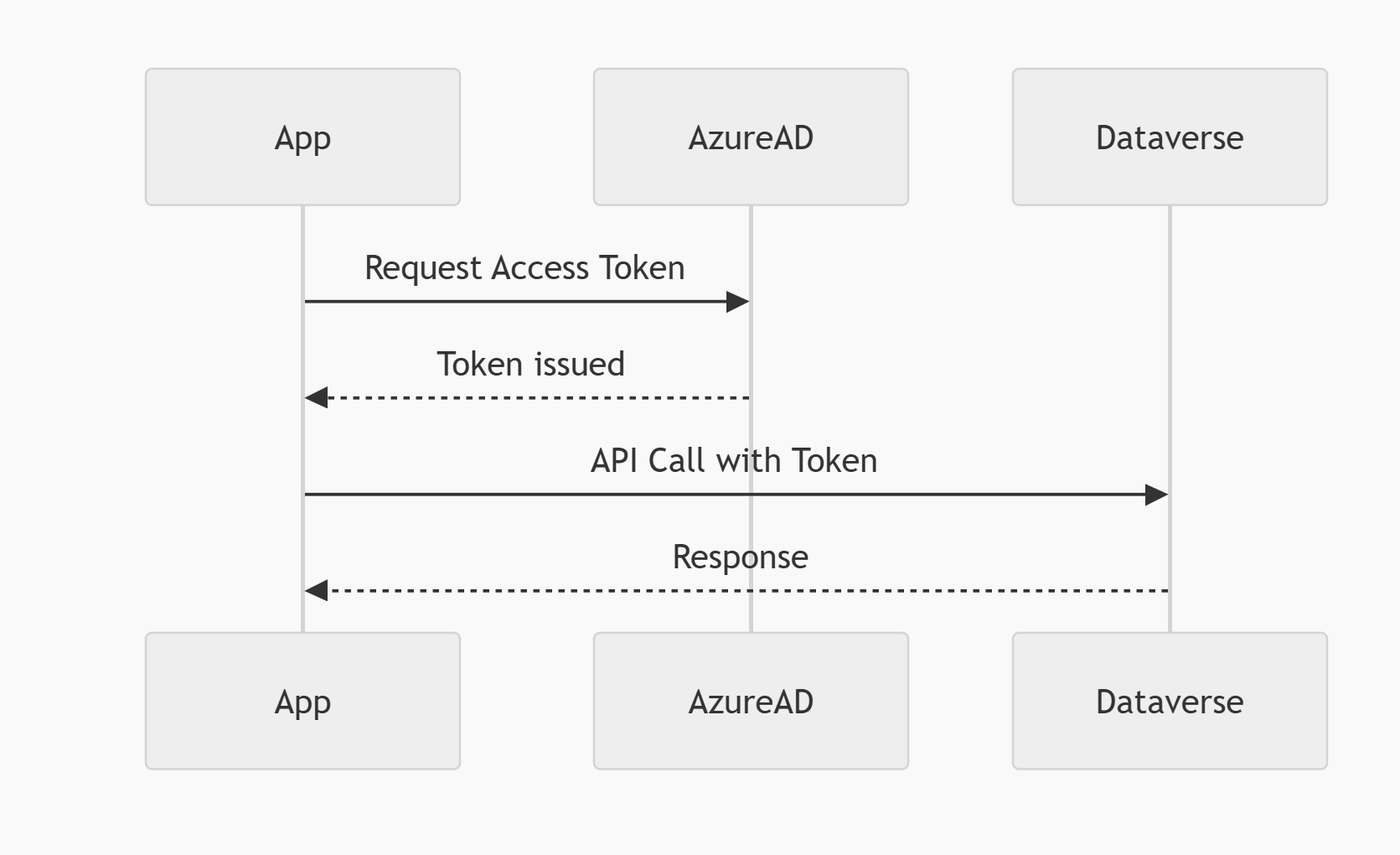
3. Azure AD Authentication
- Secure access using OAuth 2.0
- Token‑based authentication
🔐 Dataverse Authentication Flow
Customer Data Sync
Synchronize customer profiles across systemsForm Submissions
Capture user input from Sitecore and store it in DataverseMarketing Automation
Trigger campaigns and workflows based on user actionsPersonalization
Use Dataverse data to tailor content in Sitecore
✅ Benefits
- Centralized business data
- Strong alignment with Microsoft ecosystem
- Reusable data across applications
- Improved governance and security
- Clean and scalable architecture
⚠️ Challenges
- More architectural components to manage
- Requires understanding of Dataverse environments
- Needs careful .NET integration design
- Licensing considerations for large enterprises
Long-Term Enterprise Value
Despite these challenges, the approach delivers significant long‑term value for enterprise organizations.
Integrating SitecoreAI with Microsoft Dataverse enables organizations to move from fragmented systems to a connected, AI‑driven architecture.
- Sitecore focuses on delivering experiences
- Dataverse manages trusted business data
- .NET enables reliable integration
Design for Scalability & Maintainability
This separation of concerns ensures systems remain scalable, secure, and maintainable.