


Azure Functions for Dataverse CRUD in .NET
Build production-ready Azure Functions in .NET for Microsoft Dataverse
 Written by Amit Kumar
Posted on July 20, 2026 • 13 minutes • 2647 words
This article is part of a series.
- Part 1
- Part 2
- Part 3Azure Functions for Dataverse CRUD in .NET
- Part 4
- Part 5
Table of contents
- ⚡ Azure Functions for Microsoft Dataverse CRUD
- 💡 Why This Matters
- 📖 Background
- 🧱 Architecture Overview
- 🗄️ Architecture Overview
- ⚙️ Implementation
- 💻 Code Examples
- ✅ Best Practices
- ⚠️ Frequent errors
- 📈 Performance Considerations
- 🛡️ Security Considerations
- 🌍 Real-World Example
- 💬 FAQ
- 🧾 Summary
- 👣 Next Steps
- 🧾Credit/References
In the previous article of this series, we covered how to set up authentication and a secure connection between SitecoreAI (Sitecore XM Cloud) and Microsoft Dataverse. If you haven’t read that yet, start with SitecoreAI Dataverse Authentication and Connection .
This session moves from connection setup to actual implementation. We’ll build a production-ready Azure Functions backend that exposes clean CRUD operations against Microsoft Dataverse.
The goal is straightforward:
HTTP-triggered Azure Functions are a natural fit here - Microsoft’s documentation describes the HTTP trigger as a way to invoke a function with an HTTP request, which is exactly what’s needed to build a lightweight serverless API. For the Dataverse side, we’ll use the modern Microsoft.PowerPlatform.Dataverse.Client package and its ServiceClient class, which Microsoft positions as the primary implementation for Dataverse operations and which authenticates through MSAL rather than the older ADAL-based clients.
Once you have a working Dataverse connection, the next question is usually: how should a website, a SitecoreAI workflow, or an AI agent safely create, update, and delete Dataverse records?
Calling Dataverse directly from a frontend is rarely the right production pattern - it exposes too much implementation detail, complicates validation, and makes security harder to reason about. A better approach keeps Dataverse behind a controlled backend layer, where each function represents one business operation rather than a generic table endpoint.
This pattern is a good fit when:
- SitecoreAI (Sitecore XM Cloud) needs to submit structured data into Dataverse.
- A Next.js frontend needs a secure backend endpoint.
- An internal workflow needs lightweight automation.
- A future MCP tool needs predictable, auditable server-side operations.
- You want Dataverse credentials and business rules kept away from the browser.
CRITICAL
For the runtime model, Microsoft’s guidance is unambiguous going into the second half of 2026: the in-process .NET model reaches end of support on November 10, 2026, and the isolated worker model is the only path forward for .NET 9, .NET 10, and beyond. It also gives full process control, standard dependency injection, and independent versioning from the Functions host - all useful properties for a service that has to manage its own Dataverse client lifecycle.
That makes the isolated worker model the right choice for a production-grade Dataverse integration today.
This article is part of a practical Dataverse integration series:
- Architecture and integration concept.
- Authentication and secure connection between SitecoreAI (Sitecore XM Cloud) and Dataverse.
- Azure Functions for CRUD operations against Dataverse (this article).
- Calling the Azure Functions from SitecoreAI, Next.js, or MCP workflows.
In the previous article we focused on getting the connection model right. This article builds the operational layer on top of it.
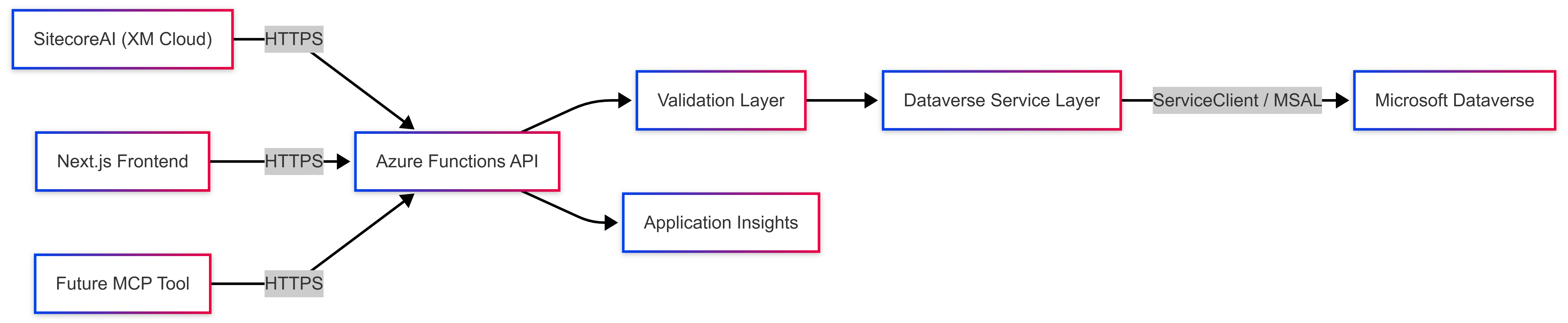
The production pattern has four layers:
| Layer | Responsibility |
|---|---|
| API layer | Azure Functions expose HTTP endpoints for create, update, and delete operations |
| Validation layer | Validates incoming payloads before calling Dataverse |
| Service layer | Wraps Dataverse ServiceClient operations |
| Observability layer | Uses ILogger and Application Insights for tracing and troubleshooting |
Azure Functions integrate directly with Application Insights, which collects the logs, performance data, and errors generated by the function app - this becomes important once you have several CRUD endpoints running in production.
For secrets, Azure Functions can reference values stored in Azure Key Vault as application settings, so the running code reads them like any other configuration value while the actual secret material stays in the vault.
For this article, assume we’re storing a simple business enquiry in Dataverse.
Example Dataverse table:
| Display Name | Logical Name | Type | Required |
|---|---|---|---|
| Name | crf51_newcolumn | Text | Yes |
crf51_email | Text | Yes | |
| Message | crf51_messag | Multiline Text | No |
| Source | crf51_source | Text | No |
Example table logical name: crf51_sitecoreenquiry
In a real implementation, confirm the table logical name, column logical names, required fields, choice values, and security roles directly against your own Dataverse environment before wiring up code.
Dataverse’s Web API basic-operations documentation walks through the same create, retrieve, update, and delete pattern we’re implementing here, just via HTTP rather than the SDK. We’re using the .NET ServiceClient instead because Microsoft explicitly positions the Dataverse.Client package as the client applications should transition to, replacing the older CrmServiceClient.
Step 1: Create the Azure Functions Project
Create a .NET isolated worker Functions project:
func init SitecoreAI-Dataverse-Azure-Functions --worker-runtime dotnet-isolated --target-framework net9.0
cd SitecoreAI-Dataverse-Azure-Functions
Add HTTP trigger functions inside Functions folder:
CreateDataverseRecord
Azure Function for creating new enquiry records in Microsoft Dataverse.
UpdateDataverseRecord
Azure Function for updating existing enquiry records in Microsoft Dataverse.
DeleteDataverseRecord
Azure Function for deleting enquiry records from Microsoft Dataverse.
GetEnquiriesFunction
Azure Function for retrieving multiple enquiry records from Microsoft Dataverse.
GetEnquiryFunction
Azure Function for retrieving a single enquiry record by ID from Microsoft Dataverse.
GetEnquiriesByEmailFunction
Azure Function for retrieving enquiry records filtered by email address from Microsoft Dataverse.
Security Updates
Scaffold new projects with --worker-runtime dotnet-isolated rather than dotnet. The in-process model is pinned at .NET 8 and stops receiving security updates after November 10, 2026, so there’s no good reason to start a new project on it today.
dotnet add package Microsoft.Azure.Functions.Worker
dotnet add package Microsoft.Azure.Functions.Worker.OpenTelemetry
dotnet add package Microsoft.Data.SqlClient
dotnet add package Microsoft.PowerPlatform.Dataverse.Client
dotnet add package OpenTelemetry.Extensions.Hosting
dotnet add package Azure.Monitor.OpenTelemetry.Exporte
dotnet add package Microsoft.Azure.Functions.Worker.Extensions.Http.AspNetCore
dotnet add package Microsoft.Azure.Functions.Worker.Sdk
Microsoft.PowerPlatform.Dataverse.Client
Microsoft.PowerPlatform.Dataverse.Client contains the .NET ServiceClient used to connect to Microsoft Dataverse, and it’s actively maintained - the package shipped an update as recently as July 2026 with retry-logic improvements for throttling responses.
For local development, use local.settings.json:
{
  "IsEncrypted": false,
  "Values": {
    "AzureWebJobsStorage": "UseDevelopmentStorage=true",
    "FUNCTIONS_WORKER_RUNTIME": "dotnet-isolated",
    "DataverseEnvironment": "YOUR-DATAVERSE-ENVIRONMENT",
    "ClientId": "YOUR-CLIENT-ID",
    "ClientSecret": "YOUR-CLIENT-SECRET"
  }
}
Step 4: Configure Dependency Injection
Program.cs:
using Microsoft.Azure.Functions.Worker.Builder;
using Microsoft.Extensions.DependencyInjection;
using Microsoft.Extensions.Hosting;
using SitecoreAI.Dataverse.AzureFunctions.Services;

// Create and configure the Azure Functions application builder
var builder = FunctionsApplication.CreateBuilder(args);

// Configure the Functions Web Application middleware
builder.ConfigureFunctionsWebApplication();

// Register application services for dependency injection
// IDataverseService: Service for interacting with Microsoft Dataverse
builder.Services.AddSingleton<IDataverseService, DataverseService>();

// Build and run the application
builder.Build().Run();
Standard .NET dependency injection is one of the concrete advantages the isolated worker model gives you over in-process-you get full control of the startup pipeline instead of relying on the Functions host’s binding infrastructure.
Request Models
using System;
using System.Collections.Generic;
using System.Linq;
using System.Text;
using System.Threading.Tasks;

namespace SitecoreAI.Dataverse.AzureFunctions.Models;

/// <summary>
/// Response model representing an enquiry retrieved from Dataverse.
/// </summary>
public sealed class EnquiryResponse
{
    /// <summary>Gets or sets the unique identifier of the enquiry.</summary>
    public Guid Id { get; set; }

    /// <summary>Gets or sets the name of the person submitting the enquiry.</summary>
    public string? Name { get; set; }

    /// <summary>Gets or sets the email address of the person submitting the enquiry.</summary>
    public string? Email { get; set; }

    /// <summary>Gets or sets the message content of the enquiry.</summary>
    public string? Message { get; set; }

    /// <summary>Gets or sets the source system from which the enquiry originated.</summary>
    public string? Source { get; set; }

    /// <summary>Gets or sets the date and time when the enquiry was created.</summary>
    public DateTime? CreatedOn { get; set; }

    /// <summary>Gets or sets the date and time when the enquiry was last modified.</summary>
    public DateTime? ModifiedOn { get; set; }
}
// Scan the QR code below to view and access the complete code repository.
namespace SitecoreAI.Dataverse.AzureFunctions.Services;

/// <summary>
/// Service interface for managing enquiry records in Microsoft Dataverse.
/// Provides CRUD operations and query capabilities for enquiry data.
/// </summary>
public interface IDataverseService
{
    /// <summary>
    /// Creates a new enquiry record in Dataverse.
    /// </summary>
    /// <param name="request">The request containing enquiry details to create.</param>
    /// <param name="cancellationToken">Token to cancel the operation.</param>
    /// <returns>The unique identifier (GUID) of the newly created enquiry.</returns>
    /// <exception cref="ArgumentException">Thrown when validation fails or field lengths exceed maximum allowed values.</exception>
    Task<Guid> CreateEnquiryAsync(CreateEnquiryRequest request, CancellationToken cancellationToken);
}
// Scan the QR code below to view and access the complete code repository.
using Microsoft.Extensions.Configuration;
using Microsoft.Extensions.Logging;
using Microsoft.PowerPlatform.Dataverse.Client;
using Microsoft.Xrm.Sdk;
using Microsoft.Xrm.Sdk.Query;
using SitecoreAI.Dataverse.AzureFunctions.Models;

namespace SitecoreAI.Dataverse.AzureFunctions.Services;

/// <summary>
/// Service implementation for managing enquiry records in Microsoft Dataverse.
/// Provides CRUD operations, validation, and data mapping for enquiry entities.
/// </summary>
public sealed class DataverseService : IDataverseService
{
    private readonly IConfiguration _configuration;
    private readonly ILogger<DataverseService> _logger;
}
// Scan the QR code below to view and access the complete code repository.
using SitecoreAI.Dataverse.AzureFunctions.Services;
using Microsoft.Azure.Functions.Worker;
using Microsoft.Azure.Functions.Worker.Http;
using Microsoft.Extensions.Logging;
using System.Net;
using System.Text.Json;
using SitecoreAI.Dataverse.AzureFunctions.Models;

namespace SitecoreAI.Dataverse.AzureFunctions.Functions;

/// <summary>
/// Azure Function for creating new enquiry records in Microsoft Dataverse.
/// </summary>

public sealed class CreateDataverseRecord
{
    private readonly IDataverseService _dataverseService;
    private readonly ILogger<CreateDataverseRecord> _logger;

    /// <summary>
    /// Initializes a new instance of the <see cref="CreateDataverseRecord"/> class.
    /// </summary>
    /// <param name="dataverseService">Service for interacting with Dataverse.</param>
    /// <param name="logger">Logger for tracking function execution.</param>
    public CreateDataverseRecord(
        IDataverseService dataverseService,
        ILogger<CreateDataverseRecord> logger)
    {
        _dataverseService = dataverseService;
        _logger = logger;
    }

    /// <summary>
    /// HTTP-triggered function that creates a new enquiry record in Dataverse.
    /// </summary>
    /// <param name="req">The HTTP request containing the enquiry data in the body.</param>
    /// <param name="executionContext">The function execution context.</param>
    /// <returns>An HTTP response with the created record ID or an error message.</returns>
    [Function("CreateDataverseRecord")]
    public async Task<HttpResponseData> Run(
        [HttpTrigger(AuthorizationLevel.Function, "post", Route = "dataverse/enquiries")]
        HttpRequestData req,
        FunctionContext executionContext)
    {
        var cancellationToken = executionContext.CancellationToken;


    }
}
The update and delete functions follow the same shape - an HTTP trigger, a thin validation step, a call into IDataverseService, and a structured JSON response. Update binds the route parameter to {id:guid} and issues a PATCH; delete binds the same route and issues a DELETE.
Explore More & Share Your Feedback
📱 Scan to access the complete SitecoreAI Dataverse Azure Functions repository
💻 Azure Functions integration, .NET 8 code, authentication setup & CRUD examples

Share your feedback or contribute to support the Sitecore developer community!
Keep functions business-focused. Avoid a single generic
POST /api/dataverse/{tableName}endpoint - it exposes too much Dataverse implementation detail. Prefer purpose-built routes like/api/dataverse/enquiries.Validate before calling Dataverse. Check required fields, email format, field lengths, and choice values before the SDK call, not after.
Keep secrets in Key Vault. Give the Function App’s managed identity read access to the secret rather than pasting connection strings into plain app settings.
Log with Application Insights. Capture operation name, correlation ID, Dataverse record ID, and execution duration so failed submissions are traceable.
Return structured responses. MCP tools and AI agents work far better against predictable JSON shapes than raw exception text.
Update only changed fields. Sending every retrieved property back on update can unnecessarily trigger Dataverse business logic, plugins, and audit history even when values haven’t changed.
| Errors | Why It Hurts | Better Approach |
|---|---|---|
| Calling Dataverse directly from the frontend | Exposes implementation detail and increases security risk | Route through Azure Functions |
| One generic CRUD endpoint for every table | Harder to secure and validate | Business-specific endpoints |
| Returning raw Dataverse exceptions | Not friendly for users or AI tools | Structured ApiResponse<T> payloads |
| Updating every field on every request | Can trigger unnecessary plugins and audit noise | Update only changed fields |
| Secrets in plain app settings | Increases operational risk | Key Vault references |
| Staying on the in-process model | Loses support after November 10, 2026 | Scaffold new projects as dotnet-isolated |
- Reuse
ServiceClientconnection pooling where possible rather than reconnecting per call. - Prefer async patterns throughout, and log dependency latency via Application Insights.
- Add retry handling only where it’s safe - the current ServiceClient already respects server-specified Retry-After values for throttling, so avoid layering an additional blind retry loop on top.
- Use idempotency keys for operations where a duplicate write would matter.
A production-ready setup should include:
- Function-level authentication, or API Management in front of the Functions app.
- Managed identity for Key Vault access instead of static secrets where feasible.
- Least-privilege Dataverse application user permissions.
- Input validation and request size limits.
- Environment-specific app registrations for dev, test, and production.
- Logging that never includes sensitive payload data.
Imagine a SitecoreAI (Sitecore XM Cloud) landing page capturing interest in a product demo. The form collects a name, email, company, message, and campaign source.
Instead of calling Dataverse directly, the page calls
POST /api/dataverse/enquiries. The Azure Function validates the payload, maps fields to Dataverse columns, creates the row, logs the operation, and returns a structured response.Later, a support workflow - or an MCP tool - can update the same record with
PATCH /api/dataverse/enquiries/{id}, and an authorised cleanup process can remove test data withDELETE /api/dataverse/enquiries/{id}. One backend now safely serves SitecoreAI, Next.js, automation scripts, and future AI agents.
Microsoft.PowerPlatform.Dataverse.Client.ServiceClient is the client Microsoft recommends applications transition to, and it authenticates via MSAL.--worker-runtime dotnet-isolated.create_enquiry instead of touching Dataverse directly.In the next article, we’ll explore how to connect these Azure Functions with SitecoreAI and store the processed records in Microsoft Dataverse.
Stay tuned! 👀
SitecoreAI and Microsoft Dataverse integrations
If you’re building SitecoreAI and Microsoft Dataverse integrations, start with a clean backend boundary. Don’t expose Dataverse complexity to the frontend or AI layer - use Azure Functions to create a secure, observable, MCP-ready service layer instead.
Read the previous article in this series here: SitecoreAI Dataverse Authentication and Connection
| Introduction to SitecoreAI and Microsoft Dataverse Integration Complete architecture guide for connecting SitecoreAI, .NET, Azure Functions, and Microsoft Dataverse | SitecoreAI Dataverse Authentication and Connection Configure secure authentication and application access between SitecoreAI and Dataverse | SitecoreAI Documentation for Developers Official developer documentation covering SitecoreAI architecture and capabilities |
| Building Custom Sitecore MCP Tools in .NET Learn how to build custom Model Context Protocol tools using .NET | Sitecore Marketer MCP Integration with VS Code Explore Sitecore MCP capabilities and AI-assisted development workflows | MCP Server vs Copilot vs GenAI Agentic AI Understand differences between MCP servers, copilots, and AI agents |
| Azure Functions HTTP Trigger Build HTTP-based serverless integrations for SitecoreAI and external systems | Guide for running C# Azure Functions in the isolated worker model Implement modern .NET Azure Functions using isolated worker architecture | Dataverse ServiceClient SDK for .NET Use Microsoft.PowerPlatform.Dataverse.Client for enterprise Dataverse integrations |
| Microsoft.PowerPlatform.Dataverse.Client NuGet Package Official .NET SDK package for connecting applications with Microsoft Dataverse | Dataverse Web API Basic Operations Sample Learn CRUD operations using Dataverse Web API | Update and Delete Dataverse Records Using Web API Manage Dataverse records through REST APIs |
| SitecoreAI Deployment and Environment Management Understand SitecoreAI deployment workflows and environment management | SitecoreAI XM Cloud Plugin Automate SitecoreAI projects using Sitecore CLI tooling | SitecoreAI Quick Reference Guide Practical guidance for planning and implementing SitecoreAI solutions |
| Azure Key Vault References for Application Settings Secure SitecoreAI integration secrets using Azure Key Vault | Configure Monitoring for Azure Functions Monitor serverless integrations with logging and diagnostics | Azure Architecture Center Enterprise architecture patterns for Azure cloud solutions |