


SitecoreAI APIs Explained: Content REST APIs vs GraphQL vs MCP vs Edge Admin
A practical guide to choosing the right SitecoreAI API for content automation, GraphQL queries, AI agents, and Edge operations
 Written by Amit Kumar
Posted on September 27, 2026 • 12 minutes • 2376 words
This article is part of a series.
- Part 1SitecoreAI APIs Explained: Content REST APIs vs GraphQL vs MCP vs Edge Admin
Table of contents
SitecoreAI has introduced new APIs for Components, Content Types, and Content Items . Announced in September 2026, these APIs give developers a more direct way to automate content structure, component definitions, and content records from external applications and deployment workflows.
This update matters because SitecoreAI now offers several API styles for different jobs. You may use REST APIs for repeatable content automation, GraphQL for connected content queries, MCP for AI-assisted work, and Edge Admin APIs for delivery operations.
The question is no longer, “Does SitecoreAI have an API?” The more useful question is:
Which SitecoreAI API is the right fit for this task?
This guide explains the role of each API in simple terms. It also helps architects, Sitecore developers, DevOps teams, and AI-tool builders choose the right option for their use case.
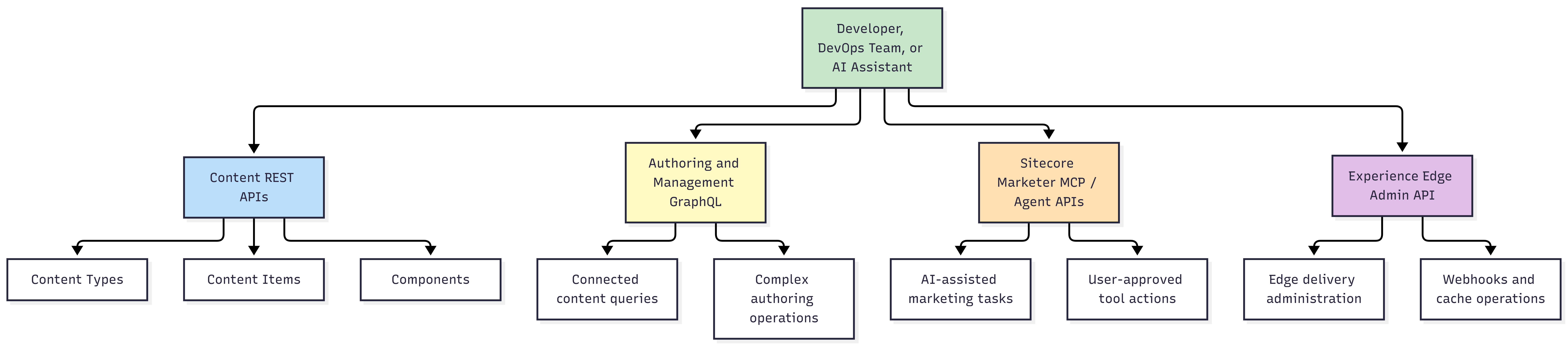
Use the API that matches the job:
- ⚙️ Content REST APIs: Create, update, and manage content types, content items, and components through scripts, integrations, or CI/CD pipelines.
- 🕸️ Authoring & Management GraphQL: Query connected authoring data, traverse parent-child hierarchies, and project flexible data shapes in a single request.
- 🤖 Sitecore Marketer MCP / Agent APIs: Enable AI assistants to complete business workflows using discoverable, permission-aware tools and user-delegated intent.
- 🌐 Experience Edge Admin API: Manage Edge delivery infrastructure, configure webhook subscriptions, and perform operational CDN cache purges.
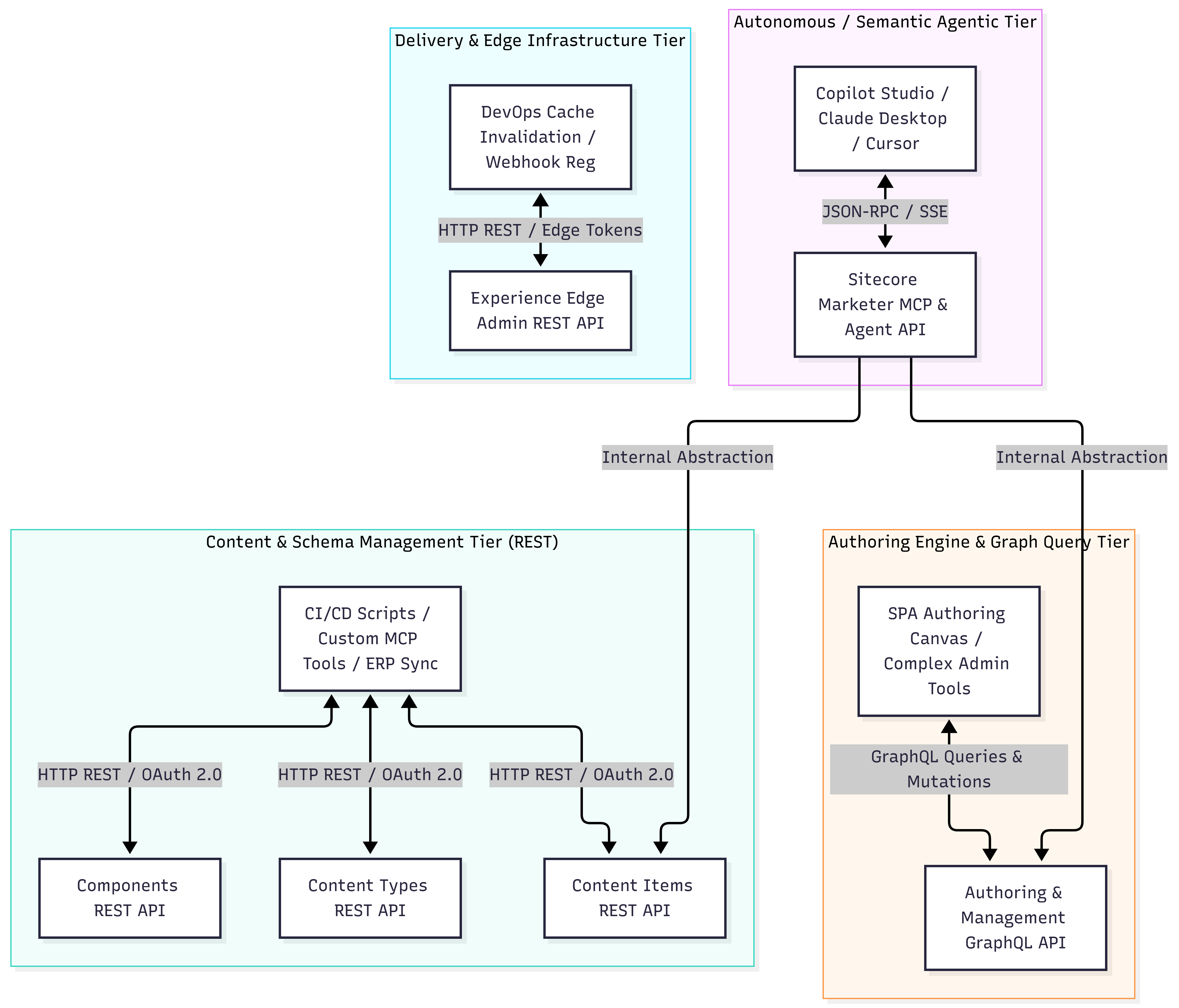
SitecoreAI APIs serve different layers of a modern headless architecture . They are complementary rather than interchangeable.
Each API occupies a specific tier within the modern composable architecture, ensuring proper separation between authoring, delivery, automation, and autonomous intelligence:
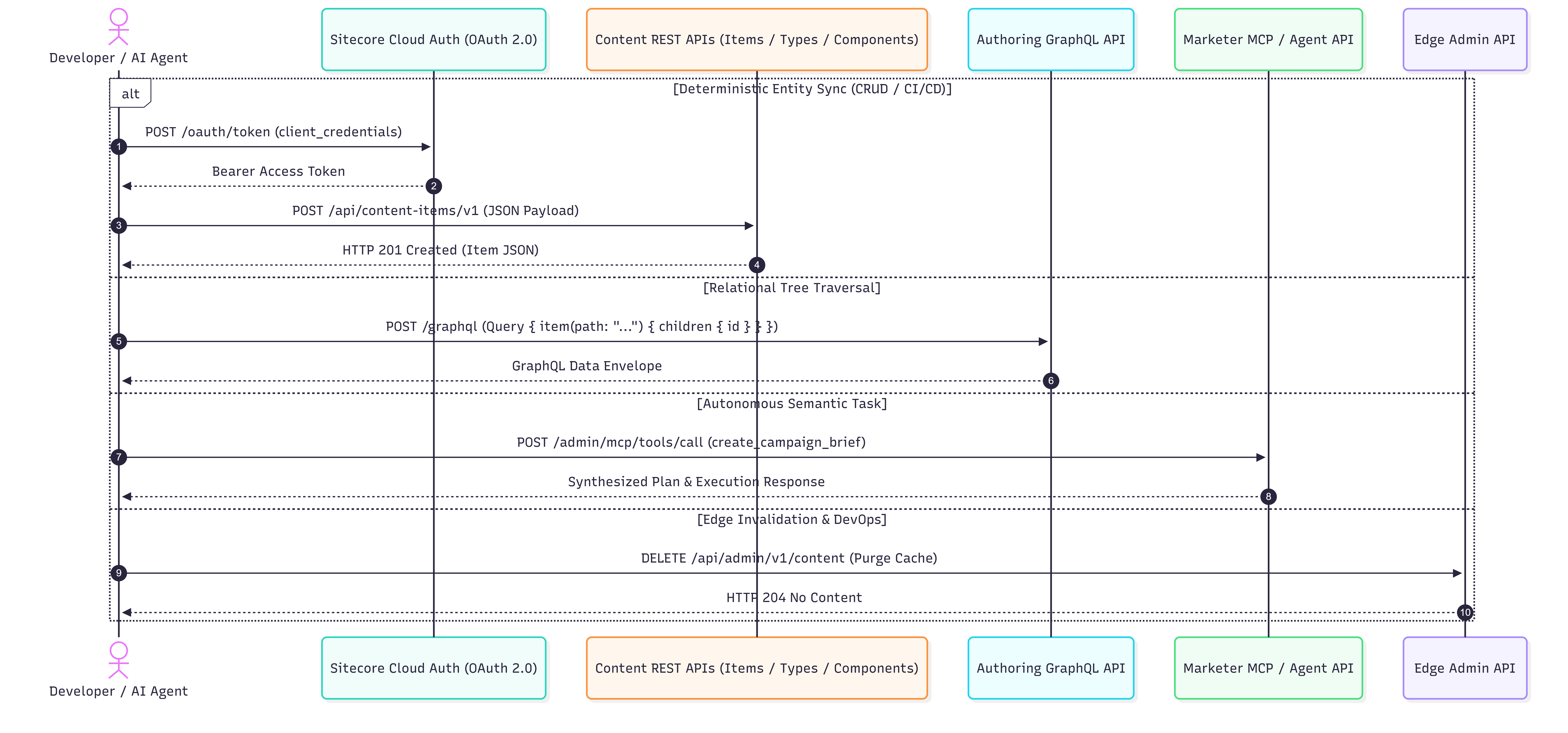
To understand how each API operates at runtime, the sequence diagram below illustrates the distinct communication lifecycles across deterministic REST syncs, relational GraphQL queries, agentic MCP tool calls, and Edge cache evictions:
SitecoreAI provides multiple APIs because each one solves a different architectural need. The table below compares the new Content REST APIs, Authoring and Management GraphQL, Marketer MCP and Agent APIs, and Experience Edge Admin API.
Use it as a quick reference to understand where each API fits, who typically uses it, and which option is best for your integration, automation, AI, or delivery scenario.
| Dimension | Content REST APIs | Authoring & Management GraphQL | Agent API / Marketer MCP | Experience Edge Admin REST |
|---|---|---|---|---|
| Architectural Layer | Content and Schema Management | Authoring and Graph Query | Agentic and Semantic Automation | Edge Delivery and Operations |
| Protocol | RESTful HTTP with JSON | GraphQL queries and mutations | Model Context Protocol (JSON-RPC over SSE or Streamable HTTP) | RESTful HTTP with JSON |
| Best use cases | CI/CD provisioning, data synchronisation, backend integrations, and structured CRUD | Deep content queries, relationship traversal, and custom authoring experiences | Conversational marketing workflows, AI assistants, and guided actions | DevOps automation, Edge webhooks, cache operations, and delivery administration |
| Typical caller | Backend services, pipelines, Azure Functions, integration workers, or custom MCP tools | Authoring extensions, custom admin applications, and headless applications | Marketers, authorised users, and AI clients such as Copilot Studio, Claude Desktop, or Cursor | DevOps pipelines, operations scripts, and tenant administration tools |
| Example | Create or update a case study from CRM or PIM data | Retrieve an item with linked content and child items | Ask an assistant to create a campaign brief | Register an Edge webhook or manage delivery cache settings |
| Authentication | OAuth 2.0 client credentials | Bearer token or Sitecore Cloud IAM session | User-delegated OAuth and consent | Experience Edge Admin credentials |
| Learning curve | Low; follows standard REST conventions | Medium; requires GraphQL schema and query knowledge | Low for users, higher for developers building custom tools | Low; focused operational endpoints |
The new Content REST APIs are intended for predictable, structured operations. They are useful when your integration knows exactly what it needs to create, retrieve, update, or delete.
They are a strong choice for automation because REST requests are simple to test, log, secure, and run from CI/CD pipelines, Azure Functions, background workers, or integration services.
Use the Content Types API to manage content models and their fields.
For example, a deployment pipeline could create a CustomerCaseStudy content type before an import process begins. This supports a “schema as code” approach, where parts of the content model can be managed through controlled automation.
Typical use cases include:
- Provisioning content types in a new environment
- Managing field definitions and validation rules
- Supporting repeatable environment setup
- Creating content models for an integration project
Use the Content Items API when you need to work with individual structured content records.
A product information management (PIM) platform, CRM system, or ERP application may need to create or update approved content in SitecoreAI. In these cases, a direct and deterministic API is easier to use than a broad, flexible query language.
Typical use cases include:
- Importing products, locations, events, or case studies
- Synchronising approved CRM or PIM data
- Updating a known content item from a backend process
- Creating serverless tools for content operations
Use the Components API to work with component definitions and related presentation configuration.
This is useful when your team wants to automate the setup of reusable page building blocks or maintain consistent component configuration across environments.
Typical use cases include:
- Managing reusable page components
- Registering component variants
- Automating component setup during solution provisioning
- Supporting internal platform tooling
When you register a presentation component via the Components REST API, it doesn’t just create a bare rendering item. Instead, it acts as an opinionated Helix provisioner, scaffolding the entire presentation, template, datasource, and placeholder structure in a single operation:
🎯 Automated Rendering Placement under Feature:
The API automatically routes the component under the standard Helix rendering container:/sitecore/layout/Renderings/Feature/Content-API-Renderings/CaseStudyHero
(Here,Content-API-Renderingsis the category folder passed via thecategory.idandcategory.nameattributes).📁 Feature Template & Parameters Scaffolding:
It automatically creates a matching template folder under Feature templates and generates both the container and rendering parameter definitions:- Folder:
/sitecore/templates/Feature/Content-API-Renderings/CaseStudyHero Folder - Template:
/sitecore/templates/Feature/Content-API-Renderings/CaseStudyHero Rendering Parameters(scaffolded from your parameter definitions)
- Folder:
📦 Tenant Datasource Container & Insert Options:
A dedicated datasource folder is provisioned under the tenant content tree:/sitecore/content/amit-kumar/Contoso/Data/CaseStudyHero Folder- Configures insert options to allow CustomerCaseStudy datasource items (passed via the
modelIdattribute). - Adds recursive insert options to allow nested
CaseStudyHero Foldercontainers.
- Configures insert options to allow CustomerCaseStudy datasource items (passed via the
🔍 Pre-Configured Datasource Queries:
The rendering definition item is automatically wired with standard multi-site datasource location queries and template locks:- Datasource Location:
query:$site/*[@@name='Data']/*[@@templatename='CaseStudyHero Folder']|query:$sharedSites/*[@@name='Data']/*[@@templatename='CaseStudyHero Folder'] - Datasource Template:
/sitecore/templates/Project/amit-kumar/CustomerCaseStudy
- Datasource Location:
🎨 Presentation Palette & Allowed Controls:
- Automatically enrolls the rendering into the site’s palette at
/sitecore/content/amit-kumar/Contoso/Presentation/Available Renderings/Content-API-Renderings. - Because the target placeholder is designated (e.g.,
main/headless-main), the component is immediately injected into the placeholder setting’s Allowed Controls, making it drag-and-drop ready in Sitecore Pages and Page Builder.
- Automatically enrolls the rendering into the site’s palette at
📮 Upcoming in Part 2: We will provide the complete Postman collection, environment variable setup, and JSON payload configurations for executing this automated provisioning step in our upcoming hands-on guide.
Architectural Discovery: Components API vs. Content Items API
Key Takeaway: While the Content Items API is designed for explicit path and CRUD item manipulation, the Components API is an architectural engine. By passing the category object, you automate what would otherwise require over seven separate item, template, and presentation configuration steps.
The Authoring and Management GraphQL API is best when your application needs connected data in one request.
GraphQL is useful when you need to retrieve an item together with related fields, child items, references, metadata, and other linked content. Instead of making several REST calls, you can define the exact data shape required by your application.
Good use cases include:
- Building custom authoring applications
- Creating authoring canvas extensions
- Reading parent-child relationships
- Querying linked content and reference fields
- Retrieving only the fields required by a custom interface
When to Avoid GraphQL
GraphQL is not always the simplest tool for a direct background task.
If a serverless job only needs to update one known content item, a REST endpoint can be easier to implement, test, and maintain. Use GraphQL when flexibility and relationships matter; use REST when the action is direct and predictable.
The Sitecore Marketer MCP server and agent capabilities operate at a higher level than ordinary CRUD APIs.
Instead of telling an API to update a field directly, a user may ask an AI assistant to help with a marketing activity. The assistant can discover approved tools, gather context, and perform actions within the permissions available to that user.
For example, an AI assistant may help a marketer prepare a campaign brief, suggest content improvements, or guide a multi-step publishing workflow.
REST API vs MCP
The difference is simple:
- A REST API is best for direct, structured operations: “Create this item with these fields.”
- An MCP tool is best for AI-assisted workflows: “Help me create a campaign page for this audience.”
Architectural Principle: MCP vs. REST
MCP does not replace REST. In fact, a custom MCP tool acts as a secure semantic gateway - safely invoking underlying REST APIs behind the scenes after rigorously validating user input, caller permissions, and core business rules.
The Experience Edge Admin API is for delivery and operational management. It is not intended for content modelling or everyday content authoring.
Use it when your team needs to automate Edge-related tasks such as delivery configuration, webhooks, and cache administration.
Typical use cases include:
- Managing Edge delivery settings
- Registering or maintaining Edge webhooks
- Supporting deployment and release processes
- Running operational tasks from DevOps automation
Critical Boundary: Edge Admin vs. Content APIs
Do not choose Experience Edge Admin API to create or update CMS content.
The Edge Admin API manages delivery infrastructure, CDN caches, and webhooks. For content-focused authoring, schema creation, and item updates, always use the Content Items REST API or the Authoring GraphQL API.
Follow this simple flow to determine the right API for your scenario:
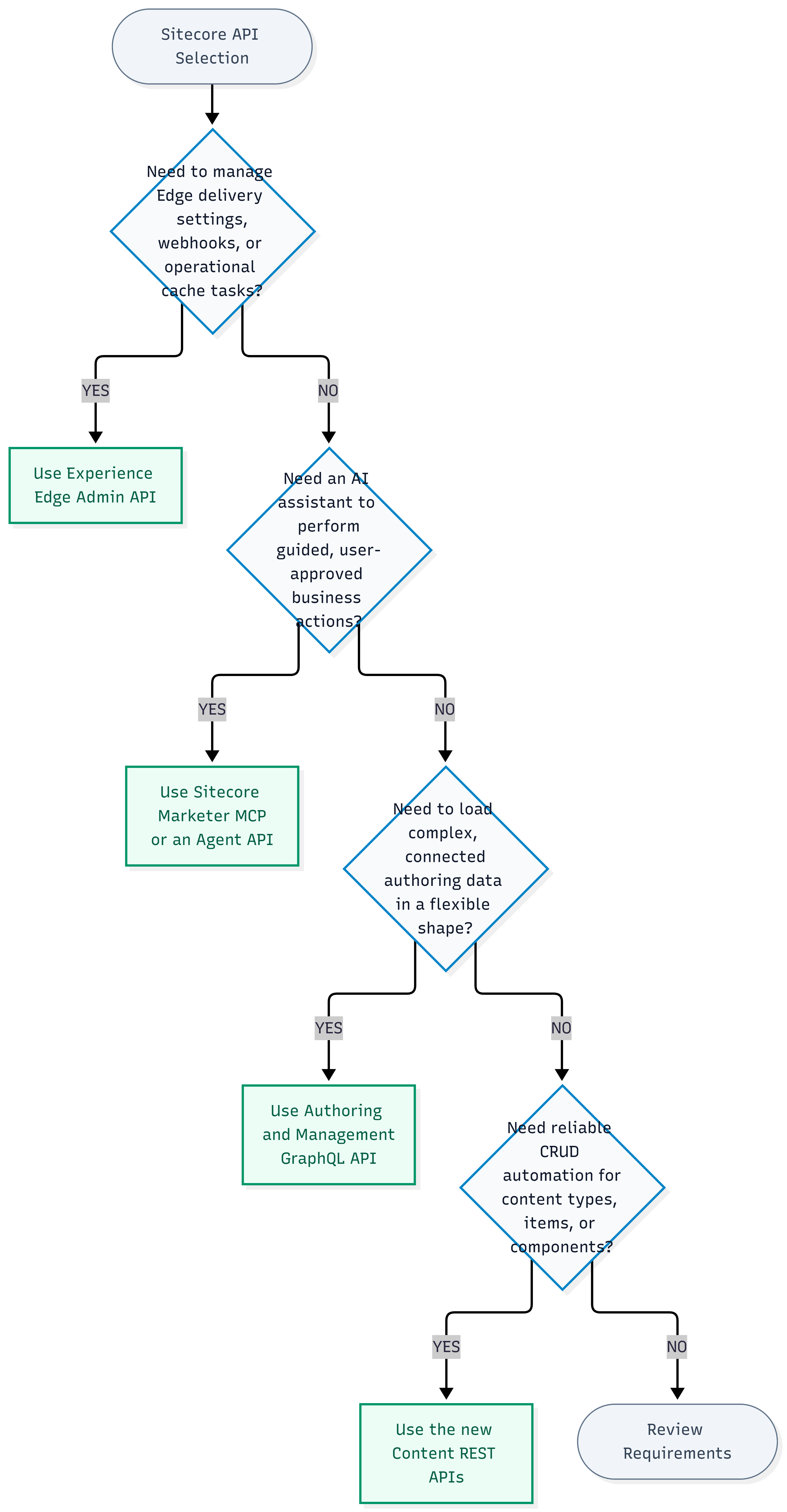
In short: match the API to the operating layer-use REST for schema and entity provisioning, GraphQL for connected authoring trees, MCP for agentic guidance, and Edge Admin for delivery infrastructure.
- 🔁 Repeatable Automation: Keep content automation idempotent where possible, ensuring that rerunning a workflow or sync job does not create duplicate items or schemas.
- 🔐 Zero Secrets in Source: Store API credentials, client secrets, and automation tokens in a secure secret store (such as Azure Key Vault or AWS Secrets Manager)—never commit them to source control or expose them in client-side applications.
- 🛡️ Strict Input Validation: Thoroughly validate incoming schema definitions and field payloads before attempting to create or update content records.
- 📊 Error Handling & Tracking: Integrate structured logging, correlation IDs, retry policies, and granular error handling across all middleware and integration services.
- 👥 Least-Privilege Access: Enforce least-privilege role assignments for service accounts, automation clients, and delegated user tokens.
- 🧩 Domain Service Encapsulation: Wrap low-level content and authoring REST APIs behind a clean business service layer when exposing capabilities as MCP tools or agent actions.
- 📖 Contract Verification: Regularly review the official API documentation before production releases, as cloud endpoints, scopes, permissions, and request contracts evolve.
They allow developers to programmatically define component schemas, manage content models, and automate structured content creation directly within the authoring pipeline.
It depends on the access pattern and automation requirements.
Use the new Content REST APIs when:
- you need direct, repeatable CRUD automation;
- you are managing schema-as-code or CI/CD pipelines;
- you are synchronizing external content catalogs;
- you want to avoid overhead for item creation, updates (PATCH), or component provisioning.
Use Authoring GraphQL when:
- you need to query interconnected graph data and complex tree hierarchies;
- you want to traverse deep parent-child relationships;
- you need flexible shape projection with a single network query.
The MCP adapter handles tool schema discovery, input validation, and user confirmations, while invoking the Content REST endpoints under the hood to perform safe, auditable content actions.
For CMS authoring, schema creation, and item modifications, always use the new Content REST APIs or the Authoring GraphQL API.
Unlike bare item endpoints, the Components API acts as an opinionated Helix provisioner.
In a single registration call, it automatically scaffolds:
- the rendering definition under `/sitecore/layout/Renderings/Feature/<Category>`;
- feature parameter templates under `/sitecore/templates/Feature/<Category>`;
- tenant datasource folders with configured insert options;
- datasource location queries and datasource template locks;
- registration in the site's Available Renderings and placeholder Allowed Controls.
Sitecore’s headless and agentic API landscape is no longer one-size-fits-all:
- Use the Content REST APIs for schema-as-code and deterministic CI/CD pipelines.
- Use Authoring GraphQL when querying relational trees and nested item graphs.
- Use Agent API / Marketer MCP for autonomous AI workflows with semantic governance.
- Reserve the Experience Edge Admin API strictly for CDN cache and delivery infrastructure operations.
Coming Up in Part 2: The Hands-On Automation Lab
Ready to start building?
In Part 2 of this series, we turn these architectural concepts into working implementations:
- 🔑 Postman Token Caching: Authenticating and managing 24-hour JWT token caching in Postman.
- 📦 Content Types Programmatically: Creating Content Types using the new authoring endpoint schema.
- 📝 Partial Updates: Creating and partially updating (
PATCH) Content Items with optimistic locking. - 🏗️ Components Provisioning: Leveraging the Components API to auto-provision complete Helix feature folders, datasources, and placeholder allowed controls in a single request.
Stay tuned for the complete Postman collection!
| Resource / Documentation | Description / Reference Link |
|---|---|
| SitecoreAI Changelog | New SitecoreAI APIs for Components, Content Types, and Content Items |
| Sitecore Developer Docs | Sitecore Authoring and Management GraphQL API Reference |
| Sitecore Experience Edge | Sitecore Experience Edge Delivery & Admin APIs |
| Custom .NET MCP Tools | Building Custom MCP Servers in .NET C# for Enterprise Extensibility |
| Sitecore Marketer MCP | SitecoreAI Marketer MCP: Setup, VS Code Integration & Architecture |
| AI Architectural Taxonomy | MCP Server Matters: Copilot vs GenAI vs Agentic AI Explained |
| SitecoreAI Modernization | SitecoreAI Pathway Migration Accelerator |