


Sitecore Search vs SitecoreAI Search Experiences
Difference between Sitecore Search vs SitecoreAI Search Experiences
 Written by Amit Kumar
Posted on July 6, 2026 • 12 minutes • 2500 words
This article is part of a series.
- Part 1Sitecore Search vs SitecoreAI Search Experiences
Table of contents
- ⚖️ Sitecore Search vs SitecoreAI Search Experiences: What Is the Difference?
- 💡 Why This Matters
- 📖 Background
- 🏗️ Architecture Overview
- ⇄ Feature-by-Feature Comparison
- 📋 Best Practices
- ⚠️ Frequent Errors
- ⚡ Performance Considerations
- 🛡️ Security Considerations
- 🌍 Real-World Example
- 💬 FAQ
- Is SitecoreAI Search Experiences a replacement for Sitecore Search?
- Can Sitecore Search be used with React or Next.js?
- Can SitecoreAI Search Experiences search the whole website?
- What is a Search Source in SitecoreAI?
- Do I need a developer for SitecoreAI Search Experiences?
- Which one should I use for recommendations?
- 🧾 Summary
- 👣 Next Steps
- 🧾Credit/References
If you work in the Sitecore ecosystem today, you have probably seen two names that sound almost interchangeable: Sitecore Search and SitecoreAI Search Experiences .
They are related, but they are not the same thing.
That distinction matters because these two capabilities solve different problems, have different implementation models, and are owned by different parts of the delivery team.
Sitecore Search is Sitecore’s standalone, AI-driven, headless search and recommendations platform. Sitecore describes it as a headless content and product discovery platform for predictive and personalized search experiences, with support for content sources, analytics, recommendations, and AI/ML-based personalization.
SitecoreAI Search Experiences, on the other hand, are page-level search experiences inside SitecoreAI. Sitecore describes a search experience as the part of a page that lets visitors search for specific content using keywords, filters, or both, but importantly, it searches against a predefined content source rather than scanning the whole website.
So the short version is this:
CRITICAL
Sitecore Search is a standalone headless search and recommendations product. SitecoreAI Search Experiences are native, scoped search components inside SitecoreAI.
Let’s break that down properly.
This is not just a naming difference. It affects architecture, effort, licensing assumptions, frontend implementation, content modelling, and long-term maintainability.
If you choose Sitecore Search when all you need is a simple scoped search component inside a SitecoreAI page, you may over-engineer the solution. If you choose SitecoreAI Search Experiences when you need cross-site search, advanced personalization, recommendations, or non-Sitecore frontend support, you may under-design the experience.
Sitecore Search
Sitecore Search is designed for fast, personalized, AI-driven search and recommendations across content and commerce use cases. Sitecore says it uses anonymous visitor interaction tracking, business rules, analytics, and AI/ML to deliver personalized search and recommendations.
SitecoreAI Search Experiences
SitecoreAI Search Experiences are designed for a more focused use case: allowing visitors to search content on a page against a controlled source that you define. Sitecore’s documentation explicitly says that a SitecoreAI search experience does not scan the entire website; it searches a predefined content source that you control.
That one sentence should drive most architecture decisions.
What Is Sitecore Search?
Sitecore Search is Sitecore’s dedicated search-as-a-service product. It is cloud-native, headless, AI-driven, and designed to power personalized content and product discovery experiences. Sitecore positions it as a platform where teams can configure search domains, manage content sources, optimize results, access analytics, and deliver predictive search experiences through a headless model.
A typical Sitecore Search implementation includes:
Content sources that crawl, pull, or push searchable content.
Entities and attributes that define indexed data.
Widgets that represent configured search or recommendation experiences.
Pages that associate widgets with URLs or URL patterns.
Business rules for boosting, burying, pinning, filtering, and tuning results.
Analytics and visitor signals to improve relevance and personalization.
Sitecore’s documentation explains that a search experience in Sitecore Search is created with a page and a widget. A widget is a headless configuration of data and functionality represented by a UI component in the browser or application, while a page is associated with a URL or URL pattern and can contain widgets and hard filters.
Sitecore Search highly flexible
This model makes Sitecore Search highly flexible. You can use it with a SitecoreAI (Sitecore XM Cloud ) implementation, but you can also use it with a non-Sitecore frontend if the integration makes sense.
What Is SitecoreAI Search Experiences?
SitecoreAI Search Experiences are a newer capability inside SitecoreAI for creating simple, dynamic search experiences on SitecoreAI-powered pages.
SitecoreAI Change Log
Sitecore’s February 2026 changelog introduced a configurable search component in SitecoreAI that can be added to pages using Page Builder, configured with the Search Configuration Manager Marketplace app, and connected to content through Search Sources.
SitecoreAI Search Experiences depend on three key pieces:
Search Sources must be available in the environment.
The Search Configuration Manager Marketplace app must be installed and enabled.
The search experience component must be copied from the starter kit into the project.
A Search Source is an index of content from the SitecoreAI content library, plus configuration that controls how that content is searched. Sitecore explains that when a visitor uses a search component, the results come from the selected search source.
When creating a source, you choose a content template from the Content editor, and SitecoreAI ingests published content items based on that template. The selected field values are stored in the source index along with search rules and settings.
Content-model Search Experience
That makes SitecoreAI Search Experiences much more content-model-driven than the standalone Sitecore Search product.
Here is the simplest way to visualise the difference:
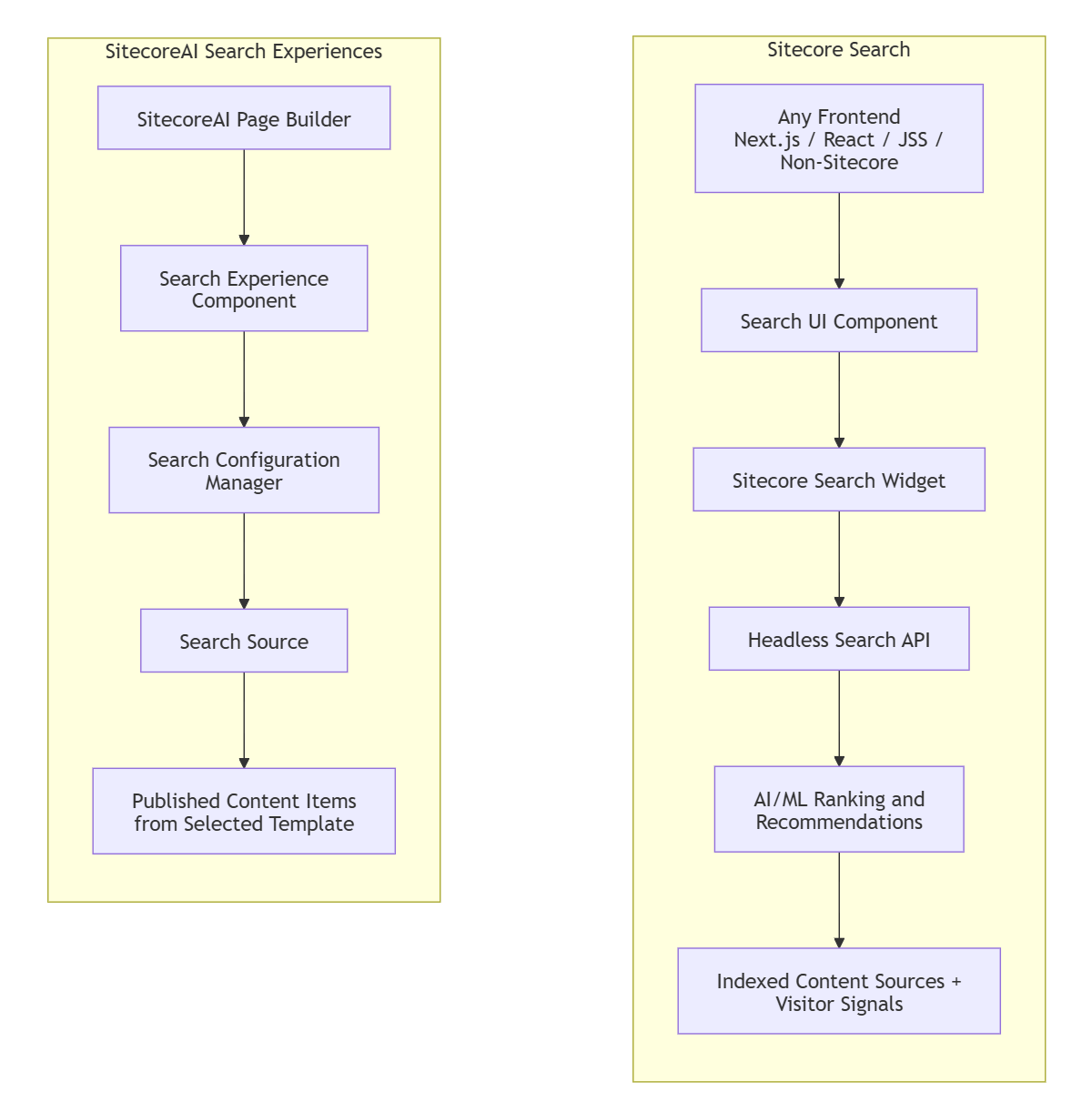
The major architectural difference is ownership.
With Sitecore Search, the search experience is typically owned by developers, architects, merchandisers, and search administrators. The frontend renders search UI components that call the Sitecore Search APIs or SDKs.
With SitecoreAI Search Experiences , the search capability is authored closer to the page canvas. It is a Page Builder component connected to a Search Source and configured through the SitecoreAI interface. Sitecore’s changelog describes this as a configurable search component added through Page Builder, with layout configured through the Search Configuration Manager Marketplace app.
| Dimension | Sitecore Search | SitecoreAI Search Experiences |
|---|---|---|
| Product model | Standalone SaaS search and recommendations platform | Native search experience inside SitecoreAI |
| Primary use case | Global search, product discovery, personalized search, recommendations | Scoped page-level or section-level search |
| Frontend model | Headless integration through APIs, widgets, and SDKs | SitecoreAI Page Builder component |
| Search scope | Larger indexed catalog, potentially across content and commerce | Predefined content source selected by the implementation team |
| Recommendations | Strong fit; recommendation experiences are part of Sitecore Search | Not the primary use case |
| Personalization | Uses visitor signals, analytics, AI/ML, and business rules | More focused on source configuration and field mapping |
| Developer involvement | Medium to high, depending on frontend and data complexity | Lower for basic setup, though a developer may need to copy/add the starter kit component |
| Content modelling dependency | Important, but not always the central implementation constraint | Very important because sources are based on selected templates |
| Non-Sitecore frontend support | Strong fit because it is headless | Not intended as a standalone frontend search service |
| Maturity | Established product | Newer capability with phased rollout |
| Best fit | Enterprise search, commerce discovery, recommendation-heavy experiences | Simple, controlled search on SitecoreAI-authored pages |
Sitecore Search
Sitecore Search supports preconfigured experiences such as preview search, search results, and recommendations. Sitecore’s documentation explains that preview search can show real-time results as the visitor types, while recommendation experiences use AI/ML recipes to show suggested items.
SitecoreAI Search Experiences
SitecoreAI Search Experiences are more tightly scoped. Sitecore documentation states that search experiences search against a predefined content source controlled by the implementation team, rather than scanning the full site.
1. Choose Based on Search Scope
Use Sitecore Search when the search experience needs to span a large catalogue, multiple content types, commerce data, recommendations, or multiple frontends.
Use SitecoreAI Search Experiences when the requirement is a scoped page or section search against a controlled content source.
SitecoreAI documentation is clear that a search experience searches against a predefined content source, not the whole website.
2. Treat Sitecore Search as an Integration Project
Sitecore Search is powerful, but it should be treated as a real product integration. You need to think about source configuration, data quality, relevance tuning, events, analytics, frontend rendering, and operational ownership.
Sitecore Search includes configuration for domains, authentication, entities, attributes, sources, features, and widgets, so developers are expected to understand the Sitecore Search interface during integration.
3. Treat SitecoreAI Search Experiences as Content-Modelling First
For SitecoreAI Search Experiences, the quality of the selected template and fields directly affects result quality.
When creating a Search Source, SitecoreAI ingests all published content items based on the selected template, and the selected field values are stored in the source index.
4. Do Not Assume Feature Availability
SitecoreAI Search Experiences are part of a phased rollout. Sitecore explicitly warns that your organization may not see the functionality yet, and that it becomes available when the environment is included in the rollout.
Before committing delivery timelines, verify tenant availability.
5. Use MCP for Build-Time and Operational Workflows, Not Visitor Search
MCP is useful when you want AI assistants or agents to connect to external data sources, tools, prompts, or workflows. The Model Context Protocol specification describes MCP as an open protocol for integrating LLM applications with external data sources and tools, with features such as resources, prompts, and tools.
That does not mean visitor-facing site search should be routed through MCP. For visitor-facing search, use Sitecore Search or SitecoreAI Search Experiences. MCP is more relevant for developer, admin, support, or editorial workflows — for example, a Copilot agent that can inspect Sitecore configuration, query deployment notes, or assist with troubleshooting.
1. Thinking SitecoreAI Search Experiences Replace Sitecore Search
They do not.
Sitecore Search remains the standalone search and recommendations platform. SitecoreAI Search Experiences are scoped components inside SitecoreAI.
Sitecore Search supports AI-driven search and recommendation experiences, while SitecoreAI Search Experiences are page-level search components connected to predefined content sources.
2. Assuming SitecoreAI Search Experiences Search the Whole Website
Whole Website
This is one of the biggest misunderstandings.
Sitecore says a SitecoreAI search experience does not scan the entire website and instead searches a predefined content source.3. Ignoring Reindexing
If you change underlying content after creating a SitecoreAI Search Source, you must reindex the source to reflect those changes. Sitecore documents this explicitly in the Search Sources guidance.
4. Picking an SDK Before Picking the Product Model
Do not begin with, Which npm package should we use? Start with, Are we implementing standalone Sitecore Search or SitecoreAI Search Experiences?
Sitecore Search’s React SDK is designed for integrating Sitecore Search into React applications, while SitecoreAI Search Experiences use the SitecoreAI component and Search Source model.
For Sitecore Search, performance depends on frontend implementation, API usage, index design, widget configuration, result payload size, and event tracking. Sitecore describes Sitecore Search as designed for speed and responsiveness, with search and recommendation experiences that learn and adapt to user intent in real time.
For SitecoreAI Search Experiences, performance depends heavily on source design. A tightly scoped source based on a clean content template should generally be easier to reason about than a broad, loosely modelled source.
SitecoreAI Search Sources store selected field values directly in the source index, along with rules and settings.
Practical recommendations:- Keep result payloads lean.
- Avoid exposing unnecessary fields.
- Use filters and facets deliberately.
- Reindex after content model or content changes.
- Test search behaviour with realistic content volumes.
- Validate both anonymous and authenticated visitor scenarios.
- Monitor frontend rendering performance, especially in Next.js client components.
For Sitecore Search, protect API keys, domain configuration, event tracking endpoints, and search payloads. Sitecore Search includes domain authentication and configuration, so implementation teams should understand the console settings during integration.
For SitecoreAI Search Experiences, governance is more about content exposure and configuration access. Search Sources are built from published content items based on selected templates, so you should verify that sensitive fields are not mapped, indexed, or displayed accidentally.
Security checklist:- Do not index restricted or unpublished content.
- Do not expose internal-only fields in search result mappings.
- Review who can manage Search Sources.
- Review who can use Search Configuration Manager.
- Treat search API keys as secrets.
- Validate search results in staging before go-live.
- Confirm that personalization and tracking comply with privacy requirements.
Imagine a B2B manufacturer running a SitecoreAI website with three search requirements:
- A global website search across product pages, resources, case studies, and support content.
- A personalized product recommendation area on product detail pages.
- A small “search within resources” component on a campaign landing page.
For the first two requirements, Sitecore Search is the better fit. It is designed for headless search and recommendations, including personalized experiences powered by indexed data and visitor behaviour.
For the third requirement, SitecoreAI Search Experiences may be the better fit. The landing page search can be scoped to a predefined Search Source based on a specific content template, and editors can configure how fields are displayed in the page component.
The best architecture may use both.
Is SitecoreAI Search Experiences a replacement for Sitecore Search?
No. SitecoreAI Search Experiences are scoped page-level search components inside SitecoreAI. Sitecore Search is the standalone AI-driven headless search and recommendations platform.
Can Sitecore Search be used with React or Next.js?
Yes. Sitecore provides a Search JS SDK for React, and the npm package includes components, functions, and query hooks for integrating search experiences into React applications.
Can SitecoreAI Search Experiences search the whole website?
Not by default. Sitecore documentation says a SitecoreAI search experience does not scan the entire website; it searches a predefined content source that you control.
What is a Search Source in SitecoreAI?
A Search Source is an index of content from the SitecoreAI content library, plus configuration that controls how that content is searched. It includes indexed data, field configuration, rules, and advanced settings.
Do I need a developer for SitecoreAI Search Experiences?
Usually yes, at least initially. Sitecore says the search component must be copied from the starter kit repository into the project, and this is typically performed by a developer.
Which one should I use for recommendations?
Use Sitecore Search. Sitecore Search includes recommendation experiences and AI/ML-driven result generation through its headless model.
Sitecore Search and SitecoreAI Search Experiences are both search-related, but they sit at different layers of the Sitecore ecosystem.
Use Sitecore Search when you need:
- Headless search
- Global site search
- Product discovery
- Recommendations
- Personalization
- Analytics-driven relevance
- React/Next.js or non-Sitecore frontend integration
Use SitecoreAI Search Experiences when you need:
- A scoped search component inside SitecoreAI
- Page Builder-based authoring
- Search against a controlled content source
- Template-driven indexing
- Lightweight search for a specific page, landing page, or content section
The simplest decision rule is:
CRITICAL
If the search experience is strategic, cross-site, personalized, or recommendation-heavy, use Sitecore Search. If it is scoped, page-level, and editor-managed inside SitecoreAI, use SitecoreAI Search Experiences.
Now that we understand the differences between Sitecore Search and SitecoreAI Search experiences, the upcoming articles will focus on how to implement SitecoreAI Search Experience in real-world scenarios.
Stay tuned! 👀