


Implementing SitecoreAI Wildcard Pages with the Next.js App Router and Content SDK
Dynamic routing, external APIs, and SEO-friendly breadcrumbs in one solution.
Posted on December 31, 2025 • 11 minutes • 2332 words
Table of contents
While working on a SitecoreAI Content SDK project with Next.js, I received a requirement that We needed to display thousands of records - specifically blog posts and product details (dynamic wildcard pages) - stored in an external system (a Headless Commerce engine and a PIM). The goal was to support dynamic wildcard pages that behave like nested blog slugs while still resolving each request to a real item in the Sitecore content tree.
The business wanted:
- Dynamic pages generated from an external API.
- Nested URLs similar to a blog slug structure.
- No manual creation of Sitecore items for every page.
- Dynamic breadcrumbs and page titles.
- A scalable solution for future integrations like PIM or Headless Commerce.
Before starting the implementation, I reviewed Sitecore’s documentation on wildcard pages .
SitecoreAI Wildcard Pages
Wildcard items allow you to create flexible, dynamic URL structures in SitecoreAI (XM Cloud) by placing a wildcard item (*) in the content tree, enabling handling of all requests matching that path pattern.
For example:
- To manage URLs like /blogs/my-first-post or /blogs/category/subcategory/article-slug, create a wildcard item under /blogs.
- The wildcard item uses a shared layout and components, but the actual content is determined dynamically at runtime based on the URL slug.
Benefits include:
- Less clutter in the content tree - no need to manually create pages for each external record.
- Easy integration with external APIs for real-time or cached data.
- Support for nested routes, like multi-level slugs such as blog categories.
- Dynamic updates to metadata, like page titles and breadcrumbs, for better SEO.
This is particularly useful for pulling data from external sources such as PIM systems, e-commerce catalogs, or custom APIs, enabling truly headless experiences.
1. Dynamic Wildcard Routing
File: src/app/[site]/[locale]/[[...path]]/page.tsx
Details: This project uses Next.js App Router using Content SDK which handles all routes with the help of src/app/[site]/[locale]/[[...path]]/page.tsx and it acts a catch‑all App Router entry.
Next.js App Router using Content SDK
The Sitecore Content SDK App Router handles every Sitecore‑driven URL and Dynamic URL (dynamic segments), no matter how deep the path is. The route uses params.site, params.locale, and params.path to resolve the correct Sitecore item through the Content SDK route resolver and then enriches the page with any required external data (for example from PIM, headless commerce, or custom APIs using custom rendering).
This single dynamic route powers all wildcard and nested blog‑style URLs without duplicating static page files. At the same time, it keeps the routing logic consistent so that visual editing, server‑side rendering, and analytics all see the same canonical path. This forms the foundation for a flexible, wildcard‑aware routing model in the App Router.
This approach ensures:
- No hardcoded routes
- Unlimited nesting
- Clean SEO-friendly URLs
2. Dynamic Context Provider
File: src/contexts/DynamicParamsContext.tsx, src/contexts/ProvidersWithParams.tsx
Details: Passes route params, slugs, and path info to all components via React context. This makes dynamic data (like blog slugs or path arrays) available throughout the app for rendering breadcrumbs, page titles, and more.
I introduced a context provider that:
- Extracts route parameters at runtime
- Makes the full slug available across components
- Keeps page components clean and reusable
This context becomes the single source of truth for:
- API queries
- Breadcrumb construction
- Page title resolution
🔗 DynamicParamsContext.tsx
// This context provides dynamic route parameters (id, slug, path, etc.)
// to all components in the Next.js App Router using Sitecore Content SDK.
// It enables features like dynamic breadcrumbs, page titles, and external API queries
// for deeply nested and wildcard routes, without needing multiple static files.
// Used in conjunction with ProvidersWithParams to inject route data from [[...path]] catch-all routes.

'use client';
import { createContext, useContext } from 'react';

// Type for dynamic route parameters extracted from Next.js App Router
export interface DynamicParams {
  id?: string;        // e.g. /blog/123 → id = '123'
  someslug?: string;  // e.g. /blog/123/slug → someslug = 'slug'
  path?: string[];    // Full path segments from [[...path]]
  blogSlug?: string;  // e.g. /blogs/[slug] → blogSlug = slug
}

// Context for sharing dynamic params across the app
export const DynamicParamsContext = createContext<DynamicParams>({});
// Hook for consuming dynamic params in any component
export const useDynamicParams = () => useContext(DynamicParamsContext);
🔗 ProvidersWithParams.tsx
// This client component wraps the app in DynamicParamsContext,
// providing dynamic route parameters to all child components.
// Used in Next.js App Router with Sitecore Content SDK to enable
// dynamic breadcrumbs, page titles, and API queries for wildcard/nested routes.
// Receives route params from [[...path]] and passes them via context.

'use client';
import { DynamicParamsContext } from 'src/contexts/DynamicParamsContext';
import Providers from 'src/Providers';
import Layout from 'src/Layout';

export default function ProvidersWithParams({ id, someslug, path, blogSlug, page, componentProps }) {
  return (
    <DynamicParamsContext.Provider value={{ id, someslug, path, blogSlug }}>
      <Providers page={page} componentProps={componentProps}>
        <Layout page={page} />
      </Providers>
    </DynamicParamsContext.Provider>
  );
}File: src/components/breadcrumbs/Breadcrumb.tsx
Details: Breadcrumbs are generated based on the current route and content. Breadcrumbs are rendered for all nested routes using the path array from context.
Using the slug array:
- Each segment is converted into a breadcrumb node
- Labels are resolved dynamically (API response or formatted slug)
- Links are generated progressively based on hierarchy
This ensures breadcrumbs remain:
- SEO-friendly
- Accurate
- Fully dynamic
🔗 Breadcrumb.tsx
// Breadcrumb component for Next.js App Router using Sitecore Content SDK.
// Dynamically renders breadcrumbs for any nested/wildcard route using the path array from context.
// Enables SEO-friendly navigation and reflects the current content hierarchy without static routes.
// Consumes dynamic params from DynamicParamsContext, which is populated by ProvidersWithParams.

import React from 'react';
import { useDynamicParams } from 'src/contexts/DynamicParamsContext';

const Breadcrumb = () => {
  const { path } = useDynamicParams();
  return (
    <nav id="breadcrumb" className="breadcrumb">
      <a href="/">Home</a>
      {Array.isArray(path) && path.map((segment, idx) => (
        <span key={idx}>
          {' / '}
          <a href={`/${path.slice(0, idx + 1).join('/')}`}>{segment}</a>
        </span>
      ))}
    </nav>
  );
};

export default Breadcrumb;File: src/app/[site]/[locale]/[[...path]]/page.tsx
Details: Page titles are generated based on the current route and content. Wildcard pages use the last path segment for the title if Sitecore returns a generic value (e.g., *).
This ensures:
- Unique titles per URL
- Better SEO indexing
- Improved click-through rates
Example conceptually:
- /blog/sitecore/wildcard-pages
- Title: Wildcard–Page
🔗 page.tsx
import { isDesignLibraryPreviewData } from "@sitecore-content-sdk/nextjs/editing";
import { notFound } from "next/navigation";
import { draftMode } from "next/headers";
import { SiteInfo } from "@sitecore-content-sdk/nextjs";
import sites from ".sitecore/sites.json";
import { routing } from "src/i18n/routing";
import scConfig from "sitecore.config";
import client from "src/lib/sitecore-client";
import Layout, { RouteFields } from "src/Layout";
import components from ".sitecore/component-map";
import Providers from "src/Providers";
import { NextIntlClientProvider } from "next-intl";
import { setRequestLocale } from "next-intl/server";
import ProvidersWithParams from 'src/contexts/ProvidersWithParams';

type PageProps = {
  params: Promise<{
    site: string;
    locale: string;
    path?: string[];
    [key: string]: string | string[] | undefined;
  }>;
  searchParams: Promise<{ [key: string]: string | string[] | undefined }>;
};


export default async function Page({ params, searchParams }: PageProps) {
  const { site, locale, path } = await params;

  let id, someslug, blogSlug;
  let isBlogDetail = false;
  if (Array.isArray(path)) {
    // blogs/[slug] → path = ['blogs', 'some-blog-slug']
    if (path[0] === 'blogs' && path.length === 2) {
      isBlogDetail = true;
      blogSlug = path[1];
    } else if (path.length === 1) {
      // Single-segment page, e.g., /About
      // You can use path[0] as the page name/slug
    } else if (path.length >= 3) {
      // Multi-segment, e.g., /mypath/123/slug
      id = path[path.length - 2];
      someslug = path[path.length - 1];
    }
  }

  const draft = await draftMode();

  // Set site and locale to be available in src/i18n/request.ts for fetching the dictionary
  setRequestLocale(`${site}_${locale}`);

  // Fetch the page data from Sitecore
  let page;
  if (draft.isEnabled) {
    const editingParams = await searchParams;
    if (isDesignLibraryPreviewData(editingParams)) {
      page = await client.getDesignLibraryData(editingParams);
    } else {
      page = await client.getPreview(editingParams);
    }
  } else {
    if (isBlogDetail && blogSlug) {
      // Fetch blog detail page by slug, e.g., from Sitecore or your API
      // Example: page = await client.getBlogDetail(blogSlug, { site, locale });
      page = await client.getPage(['blogs', blogSlug], { site, locale });
    } else {
      page = await client.getPage(path ?? [], { site, locale });
    }
  }

  // If the page is not found, return a 404
  if (!page) {
    notFound();
  }

  // Fetch the component data from Sitecore (Likely will be deprecated)
  const componentProps = await client.getComponentData(
    page.layout,
    {},
    components
  );

  // ProvidersWithParams wraps the app in a dynamic context provider, making route params
  // (id, slug, path, blogSlug) available to all components. This enables dynamic breadcrumbs,
  // page titles, and API queries for deeply nested/wildcard routes in the Next.js App Router
  // using Sitecore Content SDK. It receives route params from the catch-all [[...path]] route.
  return (
    <NextIntlClientProvider>
      <ProvidersWithParams id={id} someslug={someslug} path={path} page={page} componentProps={componentProps} blogSlug={blogSlug} />
    </NextIntlClientProvider>
  );
}

// This function gets called at build and export time to determine
// pages for SSG ("paths", as tokenized array).
export const generateStaticParams = async () => {
  if (process.env.NODE_ENV !== "development" && scConfig.generateStaticPaths) {
    // Filter sites to only include the sites this starter is designed to serve.
    // This prevents cross-site build errors when multiple starters share the same XM Cloud instance.
    const defaultSite = scConfig.defaultSite;
    const allowedSites = defaultSite
      ? sites
          .filter((site: SiteInfo) => site.name === defaultSite)
          .map((site: SiteInfo) => site.name)
      : sites.map((site: SiteInfo) => site.name);
    return await client.getAppRouterStaticParams(
      allowedSites,
      routing.locales.slice()
    );
  }
  return [];
};

// Metadata fields for the page.
export const generateMetadata = async ({ params }: PageProps) => {
  const { path, site, locale } = await params;

  // The same call as for rendering the page. Should be cached by default react behavior
  const page = await client.getPage(path ?? [], { site, locale });
  let title = (page?.layout.sitecore.route?.fields as RouteFields)?.Title?.value?.toString();
  // If title is '*' (wildcard), use the last path segment or fallback
  if (title === '*' && Array.isArray(path) && path.length > 0) {
    title = path[path.length - 1];
  }
  return {
    title: title || "Page",
  };
};
All without creating a new Sitecore item.
File: src/components/dynamic-data/DynamicData.tsx
Details: On each dynamic page, queries an external API (e.g., public dummy API) to fetch related records. Displays API data contextually based on the current route, demonstrating how external systems can be integrated with SitecoreAI content.
🔗 DynamicData.tsx
"use client";
// DynamicData component for Next.js App Router using Sitecore Content SDK.
// Consumes dynamic params from context and fetches external API data based on the current route.
// Demonstrates how to integrate external systems (e.g., PIM, Commerce) with Sitecore-driven pages.
// Useful for showing contextual data (e.g., blog slug, wildcard path) and API results on dynamic/wildcard pages.

import React, { useEffect, useState } from 'react';
import { useDynamicParams } from 'src/contexts/DynamicParamsContext';

const DUMMY_API_URL = 'https://jsonplaceholder.typicode.com/posts?_limit=3';

const DynamicData: React.FC = () => {
  const { blogSlug, path } = useDynamicParams();
  const [dummyData, setDummyData] = useState<any[]>([]);
  const [loading, setLoading] = useState(false);
  const [error, setError] = useState<string | null>(null);

  useEffect(() => {
    setLoading(true);
    fetch(DUMMY_API_URL)
      .then((res) => res.json())
      .then((data) => {
        setDummyData(data);
        setLoading(false);
      })
      .catch((err) => {
        setError('Failed to fetch dummy data');
        setLoading(false);
      });
  }, []);

  return (
    <div style={{ padding: '1rem', border: '1px solid #ccc', margin: '1rem 0' }}>
      <h2>Dynamic Data Component</h2>
      {blogSlug && (
        <div>
          <strong>Blog Slug:</strong> {blogSlug}
        </div>
      )}
      {path && path.length > 0 && (
        <div>
          <strong>Wildcard Path:</strong> {path.join(' / ')}
        </div>
      )}
      <div style={{ marginTop: '1rem' }}>
        <strong>Dummy API Data:</strong>
        {loading && <div>Loading...</div>}
        {error && <div style={{ color: 'red' }}>{error}</div>}
        {!loading && !error && (
          <ul>
            {dummyData.map((item) => (
              <li key={item.id}>
                <strong>{item.title}</strong>
                <div>{item.body}</div>
              </li>
            ))}
          </ul>
        )}
      </div>
    </div>
  );
};

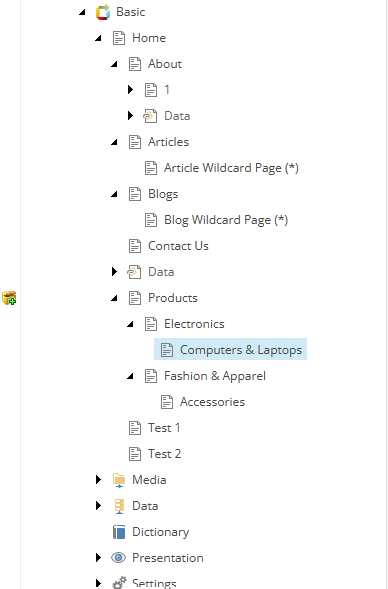
export default DynamicData;- Create Wildcard Items: In the Sitecore content tree, create items with names like * to act as wildcard placeholders
- Template Configuration: Ensure wildcard items use templates.
- Presentation Details: Assign layout and renderings that can handle dynamic content
SitecoreAI Content Tree:
- Blogs: /blogs/tech/ai/12345 resolves to a specific blog post, fetching details from Sitecore and/or an external API
- Articles: /articles/marketing/2024/5678 dynamically loads the article content and metadata
- Commerce: /products/category/shoes/sku123 pulls product data from a headless commerce API
- Nested Content: /about/team/leadership displays nested team info from Sitecore
- External Systems: /pim/items/sku999 fetches product info from a PIM system
- Use Wildcards for Scale: If your content lives in an external API, don’t sync it to Sitecore items. Use the * item.
- Context is King: Implement a DynamicParamsContext (as seen in the xmcloud-starter-js > DynamicParamsContext.tsx ) to manage route-specific data.
- SEO Matters: Always make sure your dynamic data is included in your SEO components, like Meta tags, OpenGraph, and Breadcrumbs.
- Performance: Use Next.js Incremental Static Regeneration (ISR) or strong caching for your external API calls to keep the dynamic pages very fast .
Dynamic Wildcard Routing and External API Integration Demo:
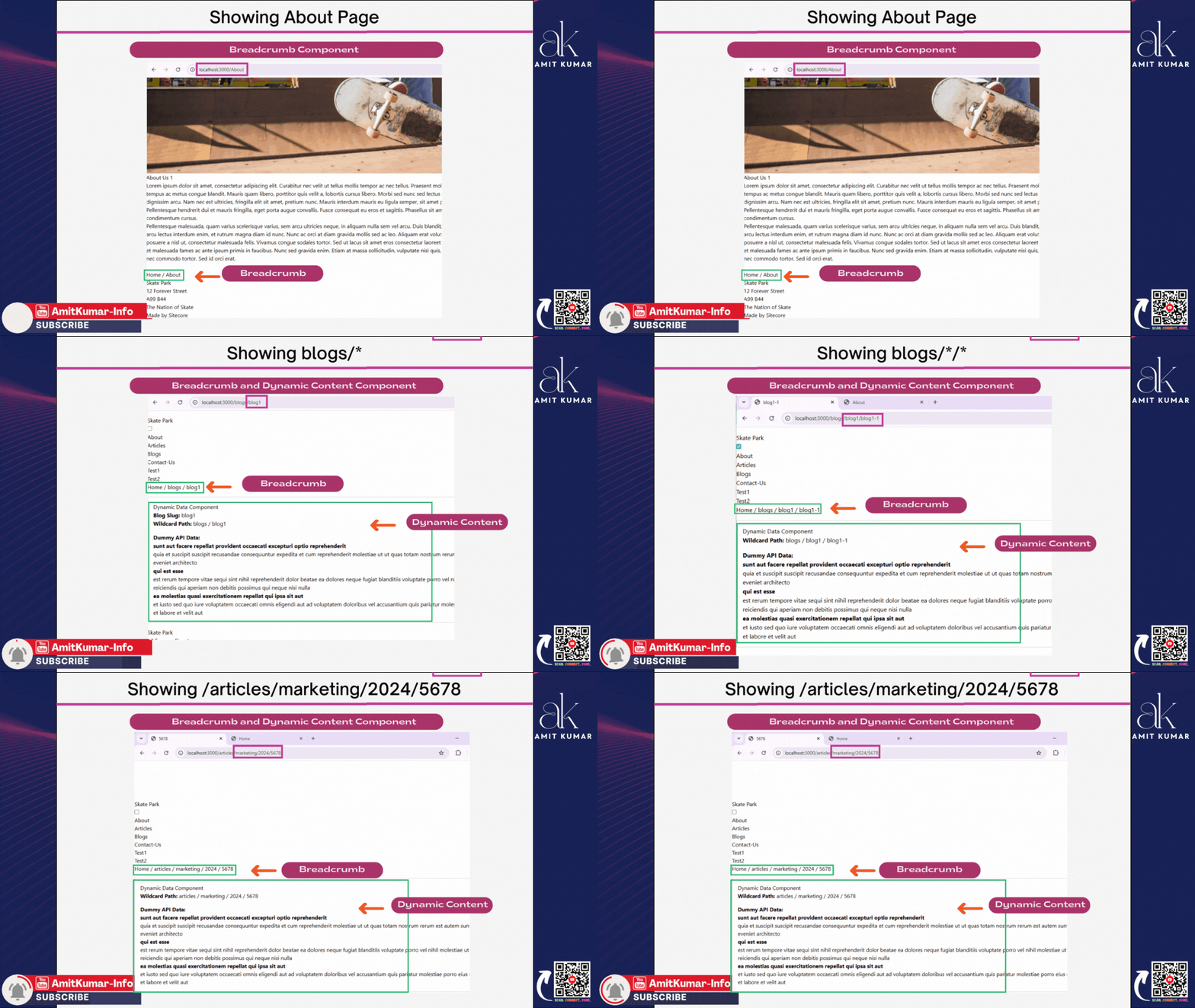
Dynamic wildcard routing in SitecoreAI (Sitecore XM Cloud) with Next.js App Router enables seamless integration of external content systems, such as PIM and headless commerce, using clean, SEO-friendly URLs. This approach allows editors to manage layouts and navigation efficiently, while developers maintain streamlined routing logic. By leveraging Sitecore’s wildcard functionality and Next.js dynamic routing , the solution supports scalable content orchestration, bridging static and dynamic data sources. Sitecore’s composable architecture further enhances flexibility by integrating modular components tailored to specific needs, allowing businesses to scale efficiently and maintain a cohesive digital experience. This modularity ensures agility and future-proofing in the digital ecosystem.
Enjoyed this guide? Give it a ⭐ and show your support!
Share Your Experience
For complete setup details and code examples, check the examples/basic-nextjs folder in the feature/dynamic-parameters branch. Access the full GitHub repository below 👇 and don’t forget to share your feedback.