


Migrating Multilingual Sitecore Forms to SitecoreAI: What You Need to Know
A Practical Architect's Guide to Multiplier Estimation, Separate Language Forms, Webhook Sharing, and Migration Governance
 Written by Amit Kumar
Posted on October 27, 2026 • 11 minutes • 2305 words
Table of contents
- 💡 Quick Takeaway
- 📊 Why This Matters
- 📋 The Migration Scenario
- 🧩 A Form Is More Than Its Fields
- 🏗️ Architecture: Localized Front, Shared Back
- 🗺️ Recommended Migration Approach
- 📐 Impact on Estimation
- ✅ Best Practices
- ⚠️ Common Pitfalls
- 🚀 Performance Considerations
- 🔐 Security Considerations
- 🛠️ Troubleshooting
- 🧑💻 Real-World Example: English & Spanish Portal
- 📋 Migration Assessment Checklist
- 💬 Frequently Asked Questions (FAQs)
- 🏁 Summary
- ➡️ Next Steps
- 📣 Call To Action
- Architectural Review & Discussion
- 📚 Credit and References
If you're moving a multilingual site from Sitecore XP or MVC to SitecoreAI (Sitecore XM Cloud), forms are one of those areas that look small in the discovery workshop and then quietly eat an entire sprint:
- 🌐 Separate Forms per Language: A single SitecoreAI Form does not carry language variants internally like legacy Sitecore Forms did. Plan a separate, first-class SitecoreAI Form for each supported language.
- 🔌 Shared Headless Integration: While presentation and validation are localized, webhooks are defined once and selected per form, allowing clean reuse across shared backends or serverless runtimes.
- 📐 The Multiplier Rule: Never estimate migration scope on unique form count alone.
The true formula is Forms × Languages × Integrations × Validation. - 🧪 Rebuild over Convert: Automated converters do not bridge the XP-to-SaaS architectural gap. Treat every form as something to inventory, recreate, reconnect, and validate across every market.
Quick Answer & Support Validation
Platform Architecture Reality:
A single SitecoreAI Form does not currently provide language-specific variants within the same form configuration. For an English and Spanish site, build an English form and a Spanish form, render each on its localized page, and let both submit to a shared backend or webhook where business processes allow.
I validated this approach directly with Sitecore Support. Always verify the SitecoreAI changelog before you lock scope, as platform capabilities move quickly.
Legacy Sitecore Forms on XP let you open a form and switch to another language version of the same form, translating field text in place. Sitecore’s documentation described this under Create a different language version of a Sitecore Form. Teams and content authors grew used to that model.
SitecoreAI Forms is a completely different product. It is a dedicated, decoupled Forms interface where forms are embedded onto pages through Pages, Components, or Experience Editor, and submissions dispatch to third-party systems through secure webhooks. It was purpose-built for a headless, composable world-not as an in-process port of the legacy XP module.
That architectural gap is where project estimates fail. We have 10 forms quietly turns into we have 10 forms across 3 languages, each requiring dedicated field schemas, local consent wording, translated validation strings, and regional webhook routing.
A standard enterprise starting point looks like this:
🌐 Multilingual MVC Footprint: A localized Sitecore XP or MVC application (for example, English and Spanish).
📝 Core Transactional Forms: Standard business-critical forms-contact us, sales enquiries, newsletter signups, and event registrations.
🗂️ In-Place Localization: Language variants nested and managed directly inside each legacy form item.
⚙️ Custom Pipeline Logic: Submit actions invoking on-prem .NET services, sending triggered emails, or synchronizing CRM records.
The target is a modern SitecoreAI front end where every localized form is a first-class configuration, not an inline translated view of another item.
English page  ➡  English SitecoreAI Form
Spanish page  ➡  Spanish SitecoreAI Form
Both can still follow a common integration pattern. The user-facing experience remains fully localized, while the integration plumbing can be shared.
What Needs Localizing?
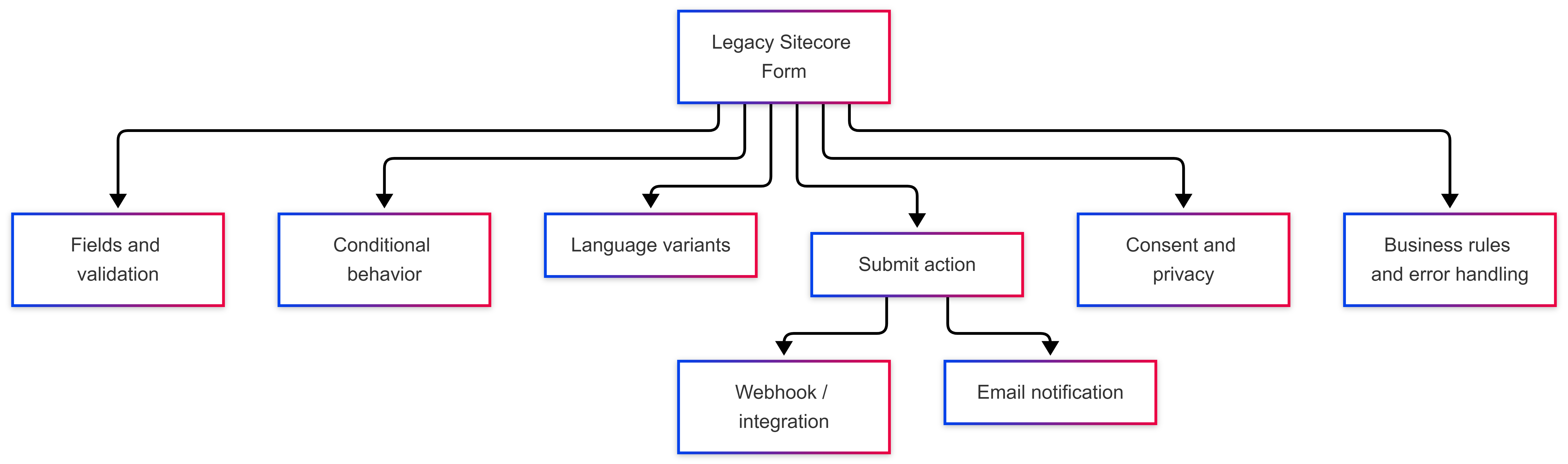
Audit every legacy form thoroughly across these layers:
- 🔤 Field labels, placeholders, and helper text
- 🔘 Dropdown, checkbox, and radio button options
- ⚠️ Client and server-side validation error messages
- 📜 Consent, legal disclosures, and GDPR/privacy policies
- 🎉 Submission success and error response messaging
- 📧 Automated email notification bodies and subject lines
- 📬 Recipient routing rules based on regional language or market
The visible form canvas is only the tip of the iceberg. A legacy form usually carries complex, unwritten business logic:
The UAT Trap
Don’t Just Migrate Field Labels:
If your migration scope only accounts for recreating input fields, the remaining undocumented dependencies-conditional display logic, custom save actions, localized auto-responders, and regional compliance text-will surface as blockers during User Acceptance Testing (UAT).
The most robust architectural pattern decouples the localized presentation from the backend processing engine:

This design keeps presentation, accessibility, and messaging strictly language-specific while maximizing the reuse of downstream services, cloud functions, and CRM integrations.
Webhook Configuration & Reusability
In SitecoreAI Forms, a webhook is defined once at the tenant level and then selected per form, making backend reuse a native platform feature.
- 🔐 Authentication Schemes: Choose from OAuth 2.0, Basic authentication, or API keys. Sitecore’s security guidance strongly discourages running webhooks with no authentication.
- 🧪 Filtering Test Submissions: SitecoreAI’s built-in webhook testing tool dispatches a payload containing the
"test": trueflag. Ensure your receiving endpoint filters on this boolean so test pings never create records in production databases.
Receiving Endpoint Best Practices
To handle submissions cleanly across localized variants:
- Standardize Field Keys: Keep payload field keys identical across languages (e.g.,
email,fullName,enquiryMessage), free of whitespace or special characters. - Decouple from Labels: Never bind backend ingestion logic to localized display labels. Bind to fixed internal field names.
- Capture Telemetry: Always log submissions alongside their form ID and language code for easy reconciliation and auditing.
Execute your migration through five structured phases:
| Phase | Activity | Architectural Goal |
|---|---|---|
| 1. Inventory | Capture form name, host URL, supported languages, conditional logic, submit actions, and PII sensitivity. | Maps legacy components to the new SaaS structure and establishes the real multiplier. |
| 2. Classify | Categorize each form: Recreate, Redesign, Replace, or Retire. | Migrations are the ideal time to eliminate dead forms that have received no submissions in the past year. |
| 3. Design | Create a formal form-to-page-to-language mapping matrix. | Serves as living documentation for content authors and editors post go-live. |
| 4. Reconnect | Configure webhooks, APIs, email triggers, and downstream integrations. | Validates network connectivity against minimal test payloads before ingesting full data schemas. |
| 5. Validate | Execute end-to-end submission journeys for every single localized form. | Ensures consent strings, localized error states, and notification triggers function across every market. |
A website with 10 business forms across 2 languages must never be estimated as 10 form configurations.
The True Implementation Formula
Calculate the Real Migration Footprint:
Never estimate migration scope on unique form count alone. Because SitecoreAI treats every localized form as an independent entity, each supported language introduces dedicated field configurations, localized validation strings, regional consent policies, and testing runs.
Once the theoretical baseline is set (10 forms × 2 languages = 20 distinct form instances), apply realistic reuse deductions where shared foundations exist:
- 🎨 Shared Styling: Reusable Tailwind/CSS theme tokens across form instances.
- 🔤 Canonical Field Schemas: Standardized backend field definitions regardless of locale.
- 🔌 Unified Ingress: Single authenticated webhook endpoints serving multiple language forms.
- 📬 Consolidated Notification Logic: Shared downstream email processing and CRM mapping rules.
Because shared webhooks, common field keys, and global styles deduct roughly 10% to 30% (2 to 6 units) of duplicate engineering effort, the realistic estimate for a 10-form, 2-language site settles between 14 and 18 form units of effort-never 10. When dealing with dozens of forms across multiple regions, ignoring this multiplier will derail project timelines.
- 🔍 Inventory During Discovery: Audit all legacy forms, submit actions, and language variants during discovery-never push this into sprint one.
- 🔤 Standardize Field Keys: Agree on unified, language-agnostic field keys before building forms in SitecoreAI.
- 🌐 Share Webhooks, Not Forms: Keep user presentation localized in separate forms while sharing robust, authenticated backend webhooks.
- 🗺️ Maintain Living Maps: Document which form maps to which page and language so authors don’t attach the wrong form variant.
- 🛡️ Update Content Governance: Update editorial workflows, since any future field change now requires updating multiple language forms.
| Pitfall | Real-World Impact |
|---|---|
| Estimating on Unique Count | Ignores the language multiplier, underestimating front-end authoring and testing effort by up to 50%. |
| Assuming Automatic Conversion | Legacy XP forms do not port directly to SitecoreAI; attempting automated conversion creates broken schemas. |
| Testing English Only | Assuming localized variants work identically leads to broken validation messages and unverified consent strings in production. |
| Hardcoding Display Labels | Binding webhook parsers to translated display labels breaks downstream CRM ingestion when copy changes. |
| Copy-Pasting Consent Copy | Different languages and regions have distinct legal compliance and retention mandates that must not be merged. |
SitecoreAI Forms render lightweight client markup. The primary performance bottleneck lies in the webhook integration pipeline: a slow downstream CRM or internal service degrades the user experience across every localized form.
Optimize Webhook Latency
Acknowledge Fast, Process Asynchronously:
HTTP 200 OK {"isSuccessful": true} right away.Design your webhook receivers (e.g., Azure Functions) to validate payloads quickly and enqueue messages directly into Azure Service Bus or Storage Queues. Offload heavy database persistence, CRM synchronizations, and email notifications to background worker processes.
- 🔑 Isolate Webhook Credentials: Never expose backend secrets, connection strings, or function keys in client-side code. Keep credentials securely managed within server-side webhook settings or Azure Key Vault.
- 🛡️ Enforce Strong Authentication: Always configure OAuth 2.0 or API key (
x-functions-key) authentication on your webhook endpoints-avoid “No Authentication” in non-development environments. - 📜 Regional PII & Data Residency: Audit PII collection per market to ensure regional data privacy compliance (GDPR, CCPA).
- 🔍 Sanitize Application Telemetry: Ensure that form submission payloads containing sensitive personal data are redacted before being logged to Application Insights or cloud monitors.
| Symptom | Likely Root Cause | Solution |
|---|---|---|
| Test succeeds, live submit fails | Payload schema or required field-key mismatch between test and live modes. | Compare the live payload structure against your endpoint request model. |
| “Negative response” from webhook | The endpoint was reached but returned an HTTP 4xx/5xx status code. | Inspect backend validation rules and exception logs on the receiving service. |
| One language works, another fails | Field keys, required attributes, or dropdown values differ between forms. | Perform a field-by-field audit between the working form and the failing variant. |
| Test submissions in CRM reports | Receiving endpoint is not evaluating the test boolean flag. | Add an explicit filter: if (payload.IsTest) return OK; to bypass production writes. |
Consider an enterprise site operating in English and Spanish with three core business forms: a Contact Us form, an Enquiry form, and an Event Registration form. All forms submit to an Azure Functions backend that writes directly to Microsoft Dataverse.
🎯 The Optimistic Estimate: 3 forms.
🌐 The Reality: 6 distinct SitecoreAI Form configurations. Each requires dedicated field labels, translated validation rules, localized GDPR/privacy consent copy, and Spanish auto-responder email templates.
🏗️ The Architecture: All 6 forms point to a single, secure webhook endpoint. Front-end configuration and testing effort roughly doubles, while backend integration effort remains unified.
Having this conversation during the initial assessment prevents painful scope renegotiations late in the build.
Review these 10 discovery questions before finalizing your project timeline:
- Unique Form Count: How many unique forms currently exist on the legacy platform?
- Supported Locales: Which languages and regional locales does each form support?
- Structural Parity: Are the translated forms structurally identical, or do fields vary by market?
- Validation Constraints: Are validation rules (e.g., postal codes, phone numbers) locale-specific?
- Downstream Actions: Are downstream submit actions and webhook endpoints shared across markets?
- Notification Localization: Are email notification templates and recipient lists localized?
- PII & Consent Handling: Does the form collect PII, and what regional consent rules apply?
- Compliance & Retention: What data retention and compliance policies govern each market?
- Ingress Destinations: Which third-party platforms (CRM, MAP, ERP) ingest the submissions?
- Reconciliation & Audit: What reporting, reconciliation, or audit logging is required post-submission?
Multilingual forms represent a platform constraint with an outsized impact on project scope. Plan separate SitecoreAI Forms per language, share the webhook integration layer where business processes permit, and rebuild rather than attempt automated conversion.
Don’t treat the migration as a 1:1 conversion:
Legacy Form ➡️ New FormTreat it as an enterprise delivery pipeline:
Form ❌ Language ❌ Submission Pattern ❌ Integration ❌ Validation ❌ Governance- Export Form Inventory: Pull an inventory of all active legacy forms, fields, and supported languages.
- Classify & Retire: Categorize each form (Recreate, Redesign, Replace, Retire) and prune obsolete assets.
- Build the Mapping Matrix: Document the form-to-page-to-language relationships.
- Prototype End-to-End: Build one localized form end-to-end with its backend webhook integration.
- Recalculate Estimates: Re-evaluate project timelines using the multilingual multiplier.
| Documentation / Topic | Reference Link |
|---|---|
| Legacy Forms Localization | Create a different language version of a Sitecore Form (XP) |
| SitecoreAI Webhooks | Work with webhooks in SitecoreAI Forms |
| SitecoreAI Changelog | Forms are now available in XM Cloud / SitecoreAI |
| Language Management | Working with languages in SitecoreAI |
| Serverless Forms Backend | Deploy Azure Functions and Connect SitecoreAI Forms to Dataverse |
| Modernization Accelerator | SitecoreAI Pathway: Migration & Modernization Accelerator |