


Build .NET MCP Tools with Azure Functions and Dataverse
Build discoverable .NET MCP tools on Azure Functions, connect Microsoft Dataverse, test Streamable HTTP, and secure production access with Microsoft Entra ID.
 Written by Amit Kumar
Posted on September 2, 2026 • 10 minutes • 1998 words
This article is part of a series.
- Part 1
- Part 2
- Part 3
- Part 4
- Part 5Build .NET MCP Tools with Azure Functions and Dataverse
Table of contents
- 📊 Introduction
- 🏗️ Architectural Overview: Azure Functions as a Remote MCP Server
- 🧩 Azure Functions MCP extension versus the C# MCP SDK
- 📋 Prerequisites
- 🔄 Convert HTTP Functions into MCP tools
- 🔍 MCP discovery and execution flow
- 🧪 Local Testing & Validation
- ☁️ Deploy and connect
- 🛡️ Best Practices & Security Summary
- 💬 Frequently Asked Questions (FAQs)
- 🏁 Conclusion
- 🧾Credit/References
In the previous article, Deploy Azure Functions and Connect SitecoreAI Forms to Microsoft Dataverse , we used HTTP-triggered .NET isolated Azure Functions as a controlled backend for customer-enquiry data.
This next step keeps the same IDataverseService layer but introduces another entry point: Model Context Protocol (MCP) tools. An MCP client can discover operations such as create_enquiry, inspect their input schemas, and invoke them through a standard protocol instead of learning bespoke REST routes.
That progression also matches the architecture established in the earlier series: business-focused Functions remain in front of Dataverse, while MCP becomes an additional controlled caller rather than replacing the service layer.
Instead of hosting a continuous container application, Azure Functions runs as an event-driven, scale-to-zero remote MCP server:
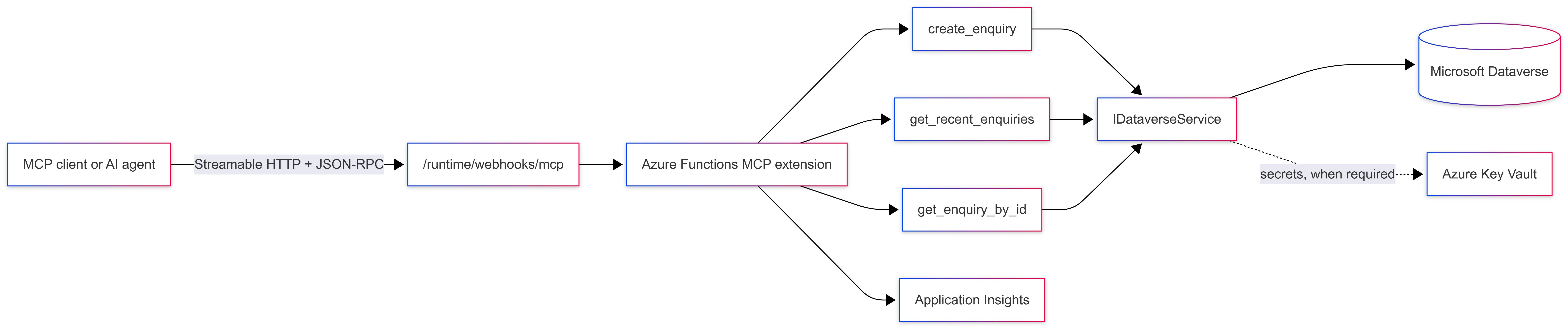
The MCP classes should remain thin adapters. They own tool names, descriptions, protocol-facing arguments, validation, and result shaping. IDataverseService continues to own Dataverse queries and writes.
This separation allows existing HTTP Functions and new MCP tools to reuse the same tested business logic. Microsoft describes ServiceClient as the primary Dataverse API implementation; it supports asynchronous create, retrieve, update, delete, and query operations and uses MSAL for authentication.
| Dimension | Azure Functions MCP extension | Official C# MCP SDK |
|---|---|---|
| Hosting | Azure Functions programming model | ASP.NET Core, hosted services, containers, App Service, ACA, AKS, or another .NET host |
| Main HTTP package | Microsoft.Azure
.Functions.Worker.Extensions.Mcp | ModelContextProtocol.AspNetCore |
| Tool declaration | [McpToolTrigger], [McpToolProperty], POCO binding, or builder configuration | [McpServerToolType], [McpServerTool], descriptions, or programmatic registration |
| Protocol setup | Extension exposes the Functions MCP endpoint | Configure AddMcpServer(), WithHttpTransport(), and MapMcp() |
| Scaling and cost | Depend on the selected Azure Functions plan | Depend on the selected ASP.NET Core hosting service |
| Authentication | Functions system key by default; built-in MCP authorization is available in preview | Full ASP.NET Core authentication and authorization pipeline |
| Operational control | Functions conventions and bindings | Greater control over routing, middleware, transport, sessions, and hosting |
| Best fit | Existing Function Apps and bindings-oriented workloads | Dedicated MCP services requiring deeper ASP.NET Core control |
The official C# SDK
separates packages by scenario: ModelContextProtocol
for most clients and stdio servers, and ModelContextProtocol.AspNetCore for HTTP servers. Its current HTTP setup uses WithHttpTransport() and MapMcp(), while tools can be discovered from classes marked with [McpServerToolType] and methods marked with [McpServerTool].
Azure Functions MCP extension
Use the Azure Functions extension when your business logic already lives in Functions and the trigger/binding model is a natural fit.
C# MCP SDK
Choose the standalone SDK when the MCP server is a first-class service requiring custom ASP.NET Core middleware or more transport control.
Microsoft currently documents these minimums for C#:
- Azure Functions Core Tools 4.0.7030 or later.
- Microsoft.Azure.Functions.Worker 2.1.0 or later.
- Microsoft.Azure.Functions.Worker.Sdk 2.0.2 or later.
- The .NET isolated worker model
Add dependencies without copying old preview wildcards:
dotnet add package Microsoft.Azure.Functions.Worker.Extensions.Mcp
dotnet add package Microsoft.Azure.Functions.Worker.ApplicationInsights
dotnet add package Microsoft.ApplicationInsights.WorkerService
dotnet add package Microsoft.PowerPlatform.Dataverse.Client
Use central package management policy.
using Microsoft.Azure.Functions.Worker.Builder;
using Microsoft.Extensions.DependencyInjection;
using Microsoft.Extensions.Hosting;
using SitecoreAI.Dataverse.Functions.Services;

var builder = FunctionsApplication.CreateBuilder(args);

builder.ConfigureFunctionsWebApplication();

builder.Services
    .AddApplicationInsightsTelemetryWorkerService()
    .ConfigureFunctionsApplicationInsights();

builder.Services.AddSingleton<IDataverseService, DataverseService>();

builder.Build().Run();Configure the server identification and instructions surfaced to the AI client during tool discovery:
{
  "version": "2.0",
  "extensions": {
    "mcp": {
      "serverName": "DataverseEnquiryMcpServer",
      "serverVersion": "1.0.0",
      "instructions": "Use these tools only for approved customer-enquiry operations.",
      "system": {
        "webhookAuthorizationLevel": "System"
      }
    }
  }
}
MCP Security
System is the default authorization level. When deployed, callers must supply the mcp_extension system key through x-functions-key or the code query parameter. Do not switch to Anonymous merely to resolve a client configuration issue; use it when a documented identity layer is intentionally protecting the endpoint.
Microsoft’s current C# API supports [McpToolTrigger], ToolInvocationContext, and parameter-level [McpToolProperty]. Tool properties are optional by default, so required arguments must be marked explicitly.
[Function(nameof(CreateEnquiryTool))]
    public async Task<string> CreateEnquiryTool(
        [McpToolTrigger(
            "create_enquiry",
            "Creates a new customer enquiry record in Microsoft Dataverse.")]
        ToolInvocationContext context,
        [McpToolProperty("fullName", "The full name of the customer submitting the enquiry.", isRequired: true)]
        string fullName,
        [McpToolProperty("email", "Customer valid email address.", isRequired: true)]
        string email,
        [McpToolProperty("message", "The enquiry message or requirements body.", isRequired: true)]
        string message,
        [McpToolProperty("source", "The origin of the lead (e.g., 'SitecoreAI Form', 'AI Agent').", isRequired: false)]
        string? source = "MCP Agent",
        CancellationToken cancellationToken = default)
    {
        _logger.LogInformation("MCP Tool 'create_enquiry' invoked for customer: {Email}", email);

        var request = new CreateEnquiryRequest
        {
            Name = fullName,
            Email = email,
            Message = message,
            Source = source ?? "MCP Agent"
        };

        var recordId = await _dataverseService.CreateEnquiryAsync(request, cancellationToken);

        return System.Text.Json.JsonSerializer.Serialize(new
        {
            success = true,
            message = "Enquiry created successfully in Dataverse.",
            recordId = recordId.ToString()
        });
} [Function(nameof(GetRecentEnquiriesTool))]
public async Task<string> GetRecentEnquiriesTool(
[McpToolTrigger(
"get_recent_enquiries",
"Retrieves a list of recent customer enquiry records from Dataverse.")]
ToolInvocationContext context,
[McpToolProperty("pageSize", "Number of enquiry records to return (1-100). Default is 10.", isRequired: false)]
int pageSize = 10,
CancellationToken cancellationToken = default)
{
var clampedSize = Math.Clamp(pageSize, 1, 100);
_logger.LogInformation("MCP Tool 'get_recent_enquiries' invoked with pageSize: {Size}", clampedSize);
var enquiries = await _dataverseService.GetEnquiriesAsync(clampedSize, cancellationToken);
return System.Text.Json.JsonSerializer.Serialize(enquiries);
} [Function(nameof(GetEnquiryByIdTool))]
public async Task<string> GetEnquiryByIdTool(
[McpToolTrigger(
"get_enquiry_by_id",
"Fetches a single enquiry record by its unique Dataverse GUID.")]
ToolInvocationContext context,
[McpToolProperty("enquiryId", "The GUID of the Dataverse enquiry record.", isRequired: true)]
string enquiryId,
CancellationToken cancellationToken = default)
{
if (!Guid.TryParse(enquiryId, out var idGuid))
{
return System.Text.Json.JsonSerializer.Serialize(new { error = "Invalid GUID format." });
}
var enquiry = await _dataverseService.GetEnquiryByIdAsync(idGuid, cancellationToken);
if (enquiry is null)
{
return System.Text.Json.JsonSerializer.Serialize(new { error = $"Record with ID {enquiryId} not found." });
}
return System.Text.Json.JsonSerializer.Serialize(enquiry);
}PII Data
Do not log customer names, email addresses, enquiry messages, access keys, or tokens.
Azure Functions Custom .NET MCP Tool
The repository includes .NET isolated Azure Functions, McpToolTrigger, Dataverse and Sitecore Edge GraphQL integrations, dependency injection, validation, and telemetry, explore the full application repository on GitHub:
👉 AmitKumar-AK/azure-functions-custom-dotnet-mcp-tool
🌟 Support the Community: Feel free to star the repo, raise issues, submit PRs, or share your feedback to help improve this resource for the Sitecore developer community!
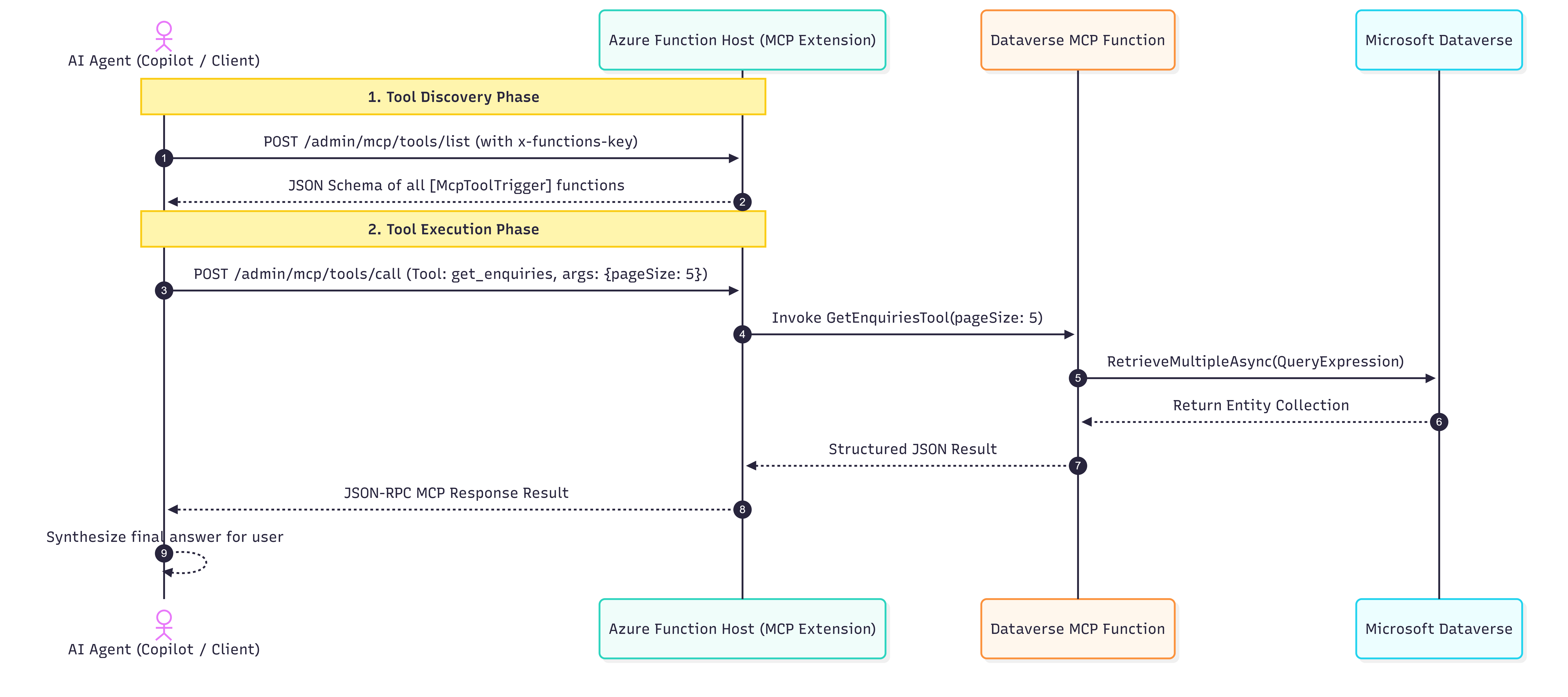
Copilot first discovers available MCP tools, selects the appropriate tool, and invokes the Azure Function. The function queries Microsoft Dataverse, returns structured data, and Copilot uses it to generate the final response.
Discover available tools ➡ Select a tool ➡ Invoke the Azure Function ➡ Query Dataverse ➡ Return structured data ➡ Generate the final response.
📺 Video Walkthrough: End-to-End Changes Details
dotnet clean
dotnet build
func start
When started, it will provision the MCP server endpoint at:
MCP server endpoint: http://localhost:<PORT NUMBER>/runtime/webhooks/mcpcurl.exe -X POST "http://localhost:7232/runtime/webhooks/mcp" \
-H "Content-Type: application/json" \
-d '{
"jsonrpc": "2.0",
"id": 104,
"method": "tools/call",
"params": {
"name": "create_enquiry",
"arguments": {
"fullName": "Priya Sharma",
"email": "priya.sharma@cloudarchitects.com",
"message": "Planning a migration to .NET Isolated Azure Functions with Key Vault secret references for Dataverse CRM integration.",
"source": "Webinar"
}
}
}'In my pervious article, Sitecore Marketer MCP & VS Code Integration , I demonstrated how to integrate the MCP tools with Visual Studio Code to discover and invoke MCP tools. The same approach applies here.
{
  "servers": {
    "local-azure-functions-mcp": {
      "type": "sse",
      "url": "http://localhost:<PORT NUMBER>/runtime/webhooks/mcp"
    }
  }
}
The type: sse setting tells the MCP client to connect using Server-Sent Events. The client uses the configured local Azure Functions URL to discover available tools and exchange MCP messages with the Function App.
Publish your Function App using the Azure CLI or Visual Studio 2022:
# Publish Function App
func azure functionapp publish func-sitecoreai-dataverse-mcp-prodWhen hosted in Azure, the MCP extension secures endpoints using the mcp_extension system key.
In the Azure Portal, open your Function App.
Navigate to App keys > System keys.
Copy the value of the mcp_extension key.
After deployment of Azure Function and getting the funciton key, update the mcp.json file
{
  "servers": {
    "local-azure-functions-mcp": {
      "type": "sse",
      "url": "http://localhost:<PORT NUMBER>/runtime/webhooks/mcp"
    },
    "azure-functions-mcp": {
      "type": "sse",
      "url": "https://<YOUR HOST NAME>.azurewebsites.net/runtime/webhooks/mcp",
      "headers": {
        "x-functions-key": "functions-key"
      }
    }
  },
  "inputs": []
}mcp.json format, configure the local or deployed Azure Functions MCP endpoint with type: "sse". For remote connections, also provide the x-functions-key header, and verify that the target client supports SSE and this authentication method before connecting.- Serverless Cost Efficiency: Azure Functions scale to zero when agents are not querying tools, eliminating idle compute costs.
- Separation of Keys: Keep standard webhook keys separate from the mcp_extension system key.
- Validation at Tool Boundary: Always enforce boundary restrictions (such as
Math.Clampon page sizes andGuid.TryParsevalidation) inside MCP tools before querying Dataverse. - Zero Secret Exposure: Use Azure Key Vault references for client credentials and Dataverse application users.
For .NET isolated Functions, tools can be defined using attributes such as McpToolTrigger and McpToolProperty, while the Functions runtime handles the MCP protocol endpoint.
Keep reusable business and data-access logic-such as IDataverseService-separate from the HTTP or MCP entry point.
This allows REST endpoints and MCP tools to reuse the same tested Dataverse integration.
It depends on the hosting and architecture requirements.
Use the Azure Functions MCP extension when:
- your backend already runs on Azure Functions;
- you want to reuse the Functions programming model;
- your tools fit naturally into event-driven or serverless workloads;
- you want to reuse existing Function services and dependencies.
Consider the C# MCP SDK when:
- MCP is a dedicated application or service;
- you need deeper ASP.NET Core middleware control;
- you need more control over routing, authentication, sessions, or hosting;
- you are deploying to containers, App Service, Azure Container Apps, AKS, or another .NET hosting
  environment.
Neither approach is universally better-the right choice depends on the operating model.
Start the Functions runtime: func start. Then connect an MCP-compatible client to: http://localhost:
Useful testing options include:
- Visual Studio Code
- MCP Inspector
- Postman
- protocol-level curl requests
For normal development, an MCP-aware client is usually easier than manually maintaining the initialization and session lifecycle with curl.
Turning an HTTP Function into an MCP tool
does not mean rewriting your Dataverse
code. Instead, you add a small adapter that describes the business operation, accepts only the required inputs, validates them, calls IDataverseService, and returns a clear, consistent result.
Azure Functions works well when your application already uses the isolated worker and bindings model. Choose the standalone C# MCP SDK when you need more control over ASP.NET Core. In both cases, a production-ready solution also requires secure identity, least-privilege access, network protection, input validation, monitoring, and proper lifecycle management.